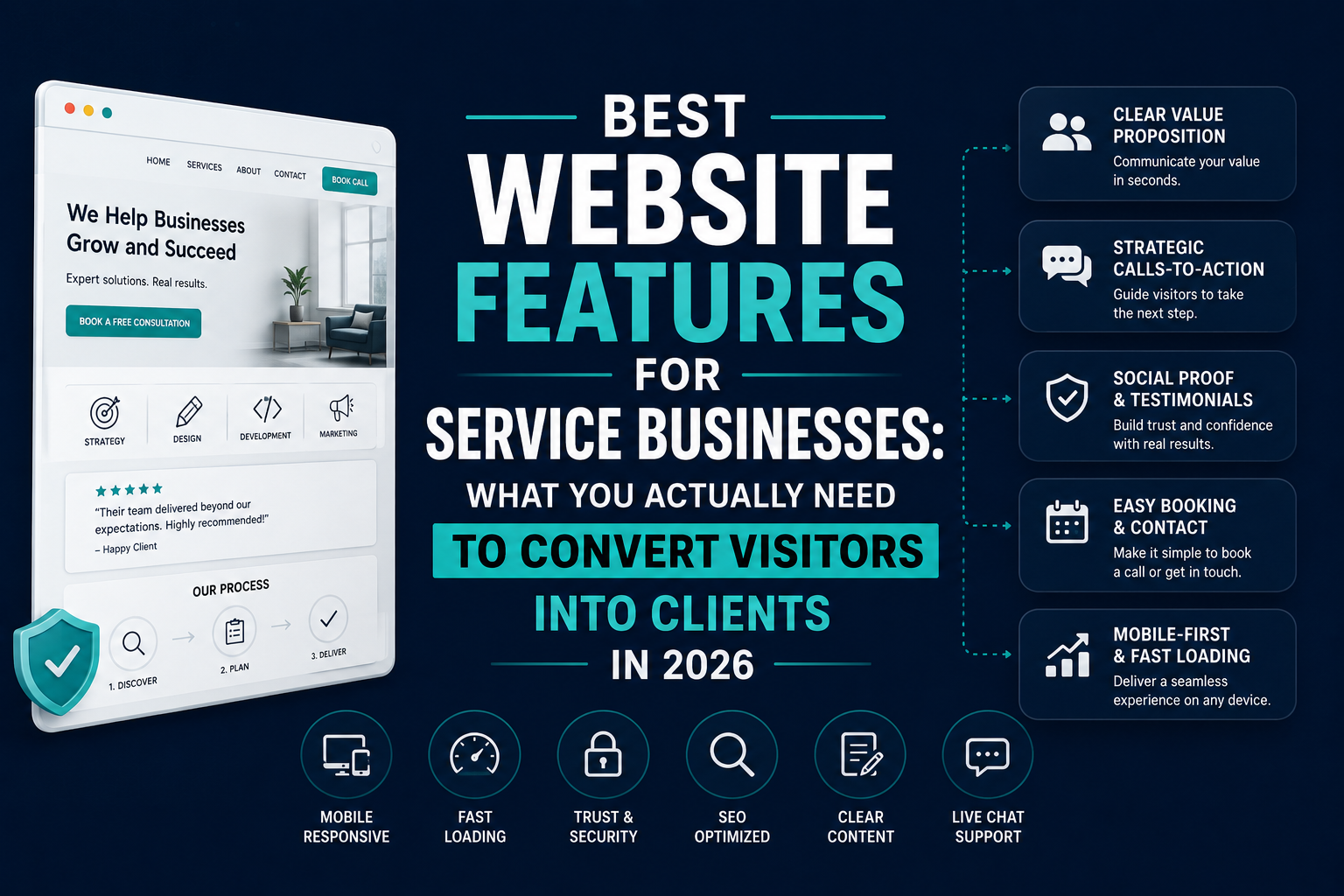
“We launched the site, ticked all the visual design boxes, and wondered for six months why nobody was filling in the contact form. Turned out our entire site was built to impress — not to convert. We had no social proof above the fold, the contact page was three clicks deep, and on mobile the CTA button was invisible. It looked beautiful. It just didn’t work.”
— Operations Director, professional services firm, post-audit debrief, 2025
This conversation plays out across thousands of service businesses every year. The website gets built, the agency declares success, and the business owner waits for leads that don’t come — because the site was designed to win design awards, not to generate enquiries.
A service business website has one commercial job: turn the right visitors into leads. Everything else — the visual design, the copy, the technical architecture — exists in service of that outcome. When any element of the site prioritises aesthetics over function, the conversion rate suffers. Quietly, consistently, expensively.
This guide covers the features that actually move the needle: the ones that build trust fast, reduce friction consistently, and give every qualified visitor a clear, compelling reason to take the next step.
The 2026 median website conversion rate across all industries is 2.35%, with the top 10% of sites converting at 11.45% — a gap that has grown to nearly 5x since 2022. For small business service sites, 3% or above on form submissions is strong. The difference between average and excellent isn’t budget. It’s whether the right features are in place and working together.
Why Most Service Business Websites Underperform
Before the features list, let’s establish what’s actually going wrong — because the same problems appear across industries so consistently that they’re almost a template for what not to do.
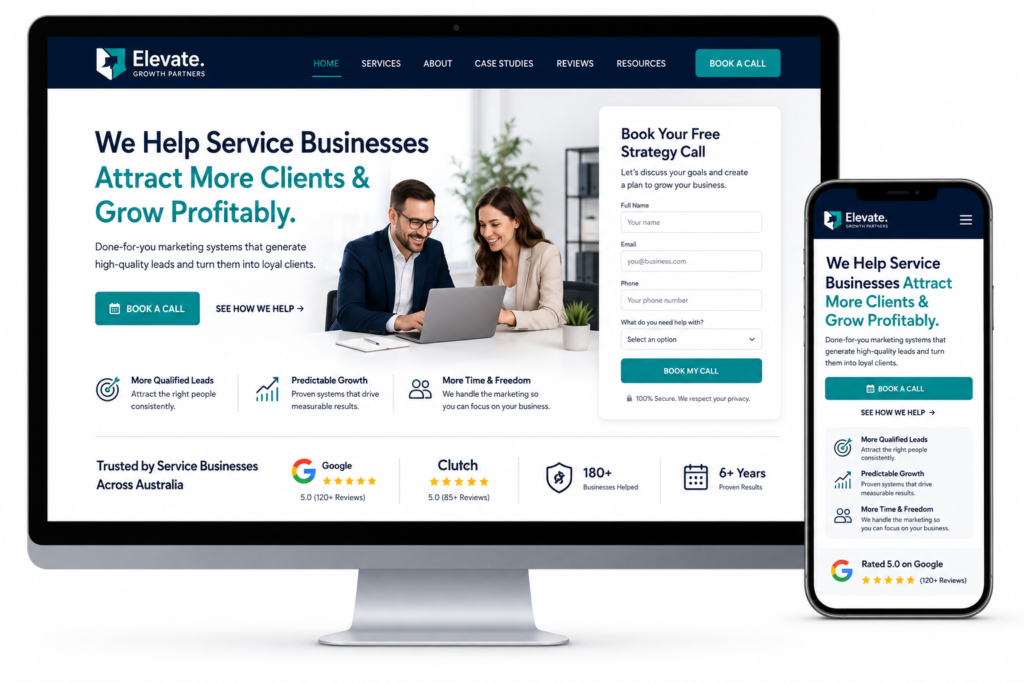
70% of small business websites fail to include a clear CTA. The majority of service business homepages open with a generic headline (“Welcome to [Business Name],” “Your Trusted Partner in [Service]”), a stock photo, and navigation to pages the visitor has to hunt through. No immediate answer to “what do you do, who is it for, and what should I do next?”
The visitor who can’t answer those three questions in five seconds leaves. And with 53% of mobile visitors abandoning a page that takes more than three seconds to load, many visitors are leaving before they’ve read a single word.
In 2026, websites without clear trust indicators — such as verified reviews, real staff profiles, certifications, compliance-ready forms, and transparent credentials — struggle to rank and convert. AI-driven search engines actively filter out low-trust websites, making trust-based UI a ranking necessity, not a design choice.
The commercial cost of these failures isn’t abstract. It’s leads that don’t come in, enquiries that don’t convert, and marketing spend that drives traffic to a site that isn’t equipped to handle it.
Here’s what the site needs instead.
Feature 1: A Value Proposition That Answers the Three Questions Immediately
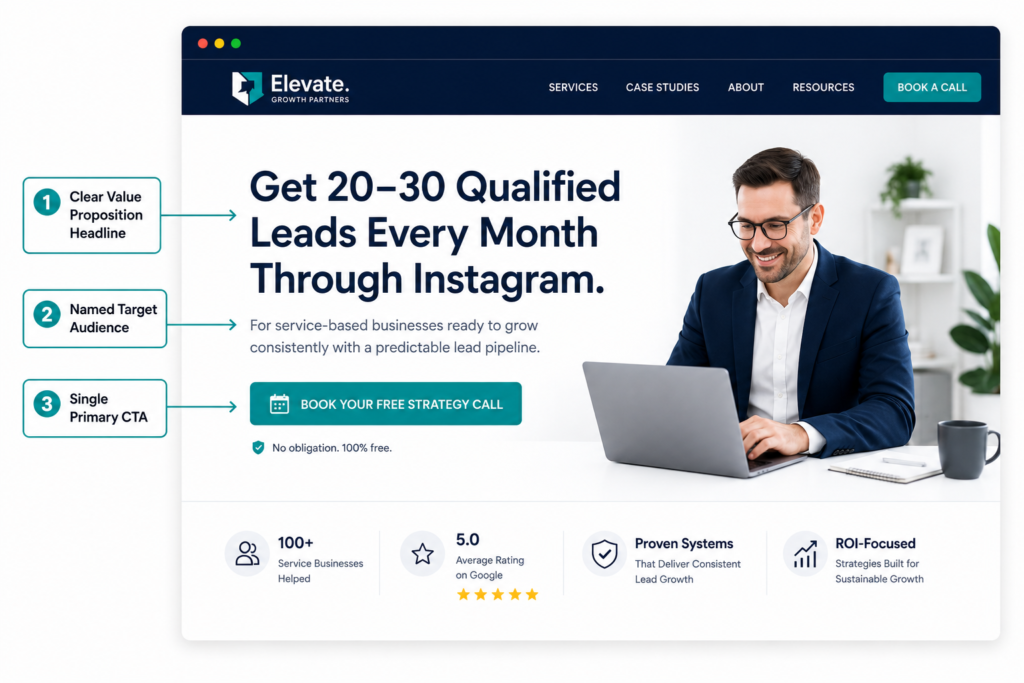
The single most important real estate on your website is the first thing a visitor sees when they land — the hero section. This is where you have approximately five seconds to communicate three things: what you do, who you do it for, and why it matters to the person reading it.
Most service businesses waste this moment. They lead with the brand name, a generic tagline, and a beautiful image. The visitor — who arrived with a specific need — has to work to figure out whether this business is relevant to them.
A high-converting hero section answers all three questions without scrolling:
- What you do: Specific, jargon-free, one sentence. Not “comprehensive digital solutions” — “We build websites for professional services firms that generate qualified leads.”
- Who it’s for: Named and specific. “For accountants, solicitors, and consultants” is more powerful than “for businesses of all sizes.”
- Why it matters: The outcome, not the process. “So you spend less time chasing work and more time doing it” speaks to the person, not to your methodology.
Below the headline, a single CTA. Not three options competing for attention — one clear, action-oriented next step that aligns with where the majority of your visitors are in their buying journey. “Book a Free Discovery Call,” “Get Your Free Quote,” “See How We’ve Helped Firms Like Yours” — whichever is most relevant to your conversion model.
CTAs placed above the fold are 73% more visible than those placed below it. This is not a minor advantage — it’s the difference between a CTA that converts and one that most visitors never see.
Feature 2: Social Proof Positioned Where It Does the Most Work
Trust is the primary barrier to conversion for service businesses. Unlike product businesses where the customer can examine what they’re buying, service businesses ask prospects to commit based on expectation — to believe that the outcome they want is actually deliverable by this specific team.
Social proof is the mechanism that bridges that gap. Adding trust badges or testimonials near a CTA can boost conversions by 15–34%, depending on placement and industry. The key word is “near.” Social proof that lives only on a dedicated Testimonials page is social proof that most visitors never encounter, because most visitors never navigate to that page.
Effective social proof on a service business website appears at multiple points in the visitor journey — not just in one section:
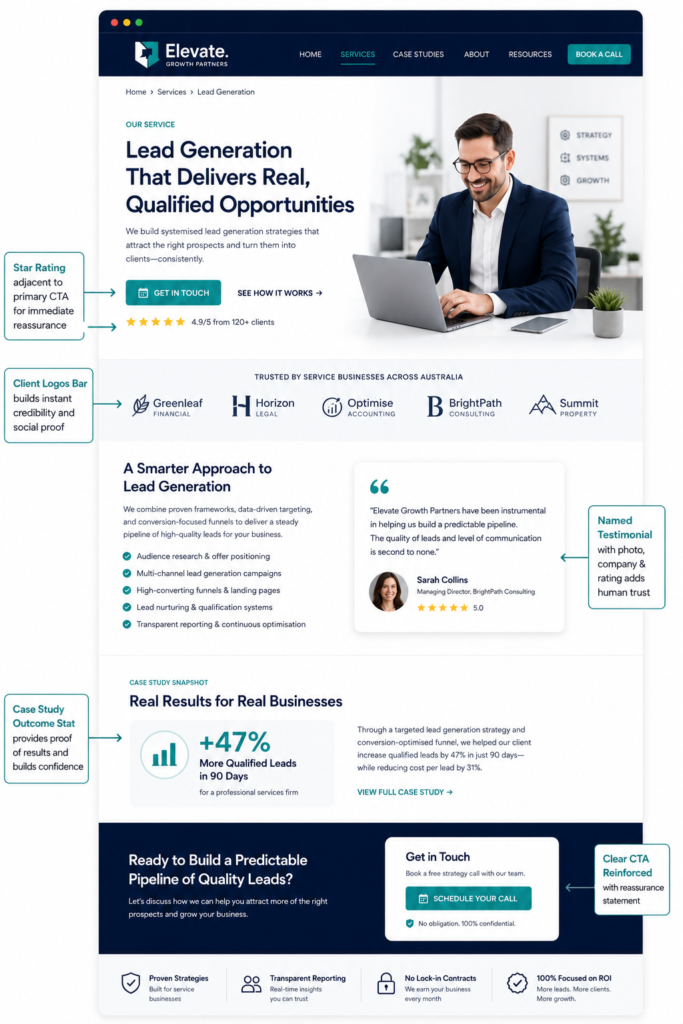
On the homepage: A testimonial or case study outcome immediately below the hero section, before the visitor has committed to scrolling. One strong, specific quote from a named client with a role and company attribution (“Working with [Agency] was the first time I felt our marketing budget was actually generating business” — James P., Managing Director, TechFirm Ltd) carries more weight than ten anonymous five-star ratings.
On service pages: Social proof that’s specific to the service being described. A testimonial about a website redesign on the website redesign page. A result from a previous client in the same industry on the industry-specific page. Relevance is the multiplier — a prospect reading about your HR consultancy services is more persuaded by a testimonial from an HR director than a general positive review.
Adjacent to every CTA: The moment just before a visitor clicks your contact form or booking button is the moment of maximum hesitation. Placing a brief trust signal — a star rating, a client count, a single strong quote — directly adjacent to the CTA reduces that hesitation at the critical moment.
In 2026, trust-focused design cues such as security badges, client logos, testimonials, and transparent privacy messaging are a key differentiator for companies looking to reassure prospects.
What makes social proof credible: Real names and real attributions. Specific outcomes, not vague compliments. Video testimonials where possible — they carry dramatically higher trust because they can’t be fabricated. Case studies with measurable results: “We increased inbound leads by 34% in the first quarter” is more persuasive than “They did excellent work.”
Feature 3: Service Pages Built Around Client Outcomes, Not Company Processes
Most service pages make the same mistake: they describe what the business does rather than what the client gets. The page structure typically follows the company’s internal logic — here are our services, here’s our process, here’s our team — rather than the client’s decision-making logic — here’s the problem I have, here’s how this service solves it, here’s what my situation looks like after.
The reframe is significant. A law firm’s “Commercial Contracts” service page written from the firm’s perspective describes expertise in contract drafting and dispute resolution. The same page written from the client’s perspective asks: “Are poorly structured contracts slowing down your deals or leaving you exposed?” — and answers directly, specifically, in terms of outcomes the client recognises.
What a high-converting service page needs:
A problem statement that resonates — the specific challenge your ideal client is facing that this service solves. Written in the language your clients use, not the language of your industry.
A clear explanation of what the service includes, written in plain terms. Not a jargon-heavy methodology description — a practical answer to “what actually happens when I work with you?”
An outcome statement — what does the client’s situation look like after this service is delivered? This is where you make the commercial case, not in features or process steps.
Social proof specific to this service or this type of client. A case study, a testimonial, a measurable outcome from a previous engagement.
A clear CTA that’s relevant to where this client is in their journey. Someone reading a detailed service page is further along in their evaluation than someone on the homepage — the CTA can be more direct. “Book a Service Discovery Call” or “Request a Project Proposal” rather than the generic “Contact Us.”
Visitors from ChatGPT and Perplexity convert at 3.49% versus 2.86% from traditional organic search — AI search is now your highest-intent traffic source. Service pages that are structured around direct answers to specific questions are not only better for conversion — they’re more likely to be cited by AI tools that generate responses to queries like “what does [service type] include?” or “which [service] businesses are recommended in [city]?” That dual function is one of the highest-leverage improvements a service business can make to their website in 2026.
Feature 4: An Online Booking or Enquiry System That Removes Friction
Here’s a conversion principle that applies to every service business regardless of sector: the easier you make it to take the next step, the more people will take it. This sounds obvious, and yet the majority of service business websites still send interested visitors to a generic “Contact Us” page with a form that asks for six pieces of information and offers no indication of what happens after they submit.
70% of clients prefer to book appointments online. The businesses that give visitors a way to book a call, schedule a consultation, or receive an automated quote response — directly on the page they’re already reading — convert those visitors at meaningfully higher rates than businesses that require a separate enquiry process.
What this looks like in practice:
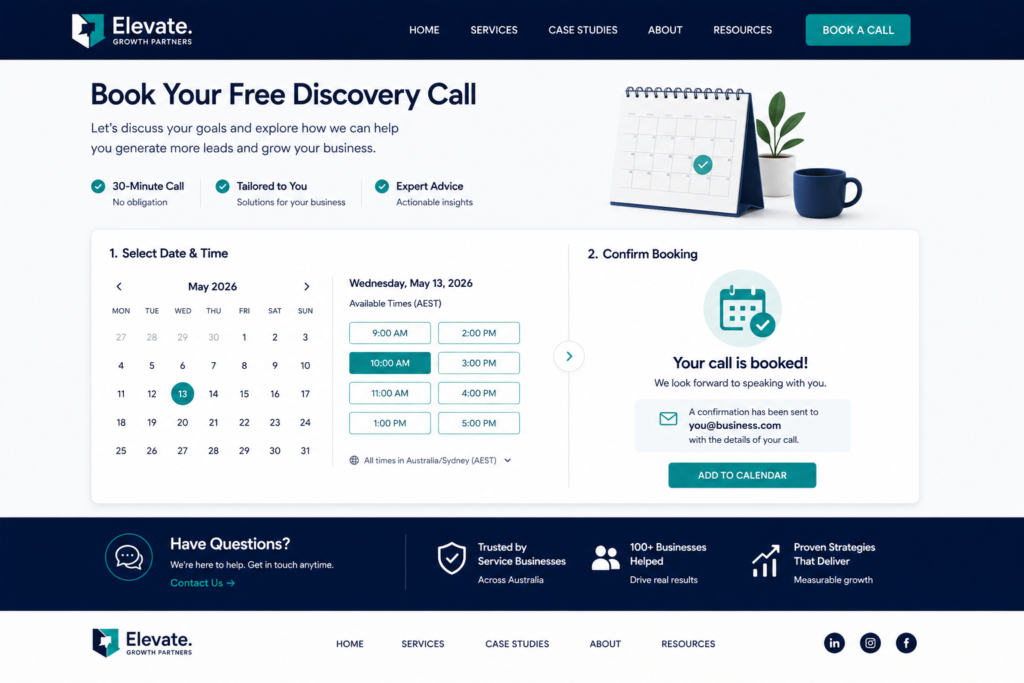
An embedded booking widget (Calendly, Acuity, TidyCal, or industry-specific equivalents) on your key service pages and your contact page. The prospect sees your available slots, picks one that works for them, and books without waiting for an email response — all in under two minutes. That immediacy removes the cognitive load of “I’ll contact them later” — which, for most potential clients, means never.
For businesses where a direct booking isn’t appropriate (complex B2B services, high-value projects requiring scoping), a streamlined contact form with no more than four fields and a clear indication of what happens next (“We respond within two business hours”) outperforms lengthy forms by significant margins. Every additional field in a form reduces completion rate. Ask only what you genuinely need to have an initial conversation.
The confirmation experience matters too. An automated confirmation email that includes useful information — what to prepare for the call, a brief summary of what you’ll discuss, a link to cancel or rescheduled — sets a professional tone that begins building confidence before the first conversation.
Feature 5: Mobile Performance That Doesn’t Lose You Leads Every Day
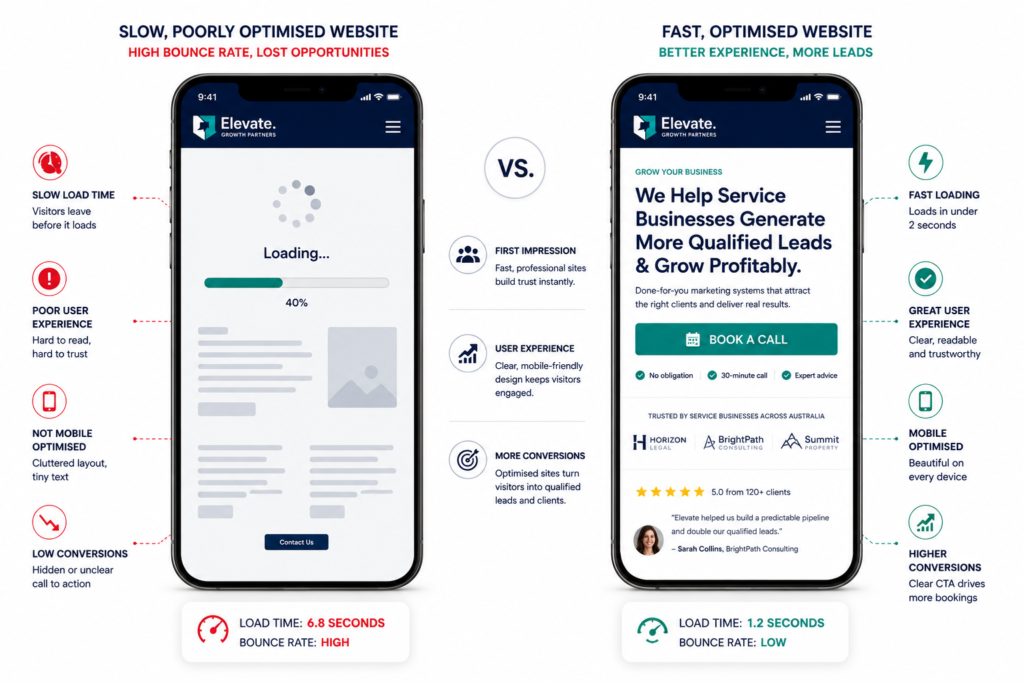
Mobile converts at 1.82% versus desktop’s 3.14% — a 42% gap, up from 38% in 2024, despite ‘mobile-first’ being a standard for over a decade. More than 70% of small business website traffic comes from mobile devices. Those two statistics together tell a clear story: most service business leads are arriving on mobile, and most service business websites are converting them at roughly half the rate they convert desktop visitors.
The gap isn’t inevitable. It’s a function of how the site was built. Sites designed mobile-first — where the mobile experience is the primary design and desktop is the expansion — consistently outperform sites designed desktop-first and then “made responsive.”
What mobile performance means for service businesses:
Page speed. Google’s target for Largest Contentful Paint (LCP) is under 2.5 seconds — on mobile. A service business homepage with uncompressed hero images and unoptimised scripts routinely loads in 5–8 seconds on mobile connections. Faster sites with approximately one-second load times, mobile-first checkout, and AI-driven CTAs materially raise conversion rates. Every second of delay reduces conversion rate meaningfully.
Tap target sizing. Buttons and links on mobile need to be large enough to tap accurately without zooming. A contact button that’s 24px wide on mobile is essentially unusable — and the frustration of a tap that misses a target and opens the wrong page is enough to send a visitor straight to a competitor.
Form usability on mobile. Multi-field contact forms that require extensive typing on a mobile keyboard have poor completion rates. Reduce field count, use appropriate keyboard types for each field (numeric keyboard for phone numbers, email keyboard for email addresses), and test form completion on a real phone — not a browser simulation.
Navigation clarity. Mobile navigation that requires multiple taps to reach key service pages creates drop-off. The services most likely to generate enquiries should be accessible from the mobile homepage in one tap.
Feature 6: A Team Page That Humanises the Business
Service businesses sell expertise and trust as much as they sell deliverables. The person who signs up for a legal retainer, chooses a marketing agency, or books a financial adviser is buying into a relationship — with the people they’ll actually be working with. A website that hides those people behind a corporate veneer is missing one of the most commercially important trust-building opportunities available.
The team page is one of the most consistently underinvested pages on service business websites. Stock photography of diverse professionals in generic office spaces. Brief bios that list qualifications without personality. No sense of who these people actually are, how they think, or why they’re good at what they do.
What a high-performing team page does:
Real photography. Professional, consistent, but human — not the anonymous corporate headshots that could belong to anyone. A photo where the person looks like themselves, in a context that reflects the work environment, builds far more connection than a white-background studio shot.
Genuine bios. Beyond credentials, what does this person care about professionally? What’s their approach? What have they done that’s unusual or specific? A senior consultant who spent three years working embedded in NHS procurement teams before moving to private consultancy has a story that no generic bio can convey — and that story is a differentiator.
Linked profiles. Each team member’s LinkedIn, relevant publications, or speaking history linked from their bio amplifies your entity authority — both for visitors who want to verify credentials and for AI tools that use external profile consistency to assess the credibility of the people behind the content.
Trust-focused UX design is critical because industries like healthcare, legal, and home services fall under Google’s high E-E-A-T standards. Websites without verified reviews, real staff profiles, certifications, and transparent credentials struggle to rank and convert.
Author attribution matters for content too. Every blog post, guide, and case study should be attributed to a named team member with their role and a brief bio. This is both an EEAT signal for Google and a GEO signal for AI tools — it tells both systems that real, accountable experts created this content.
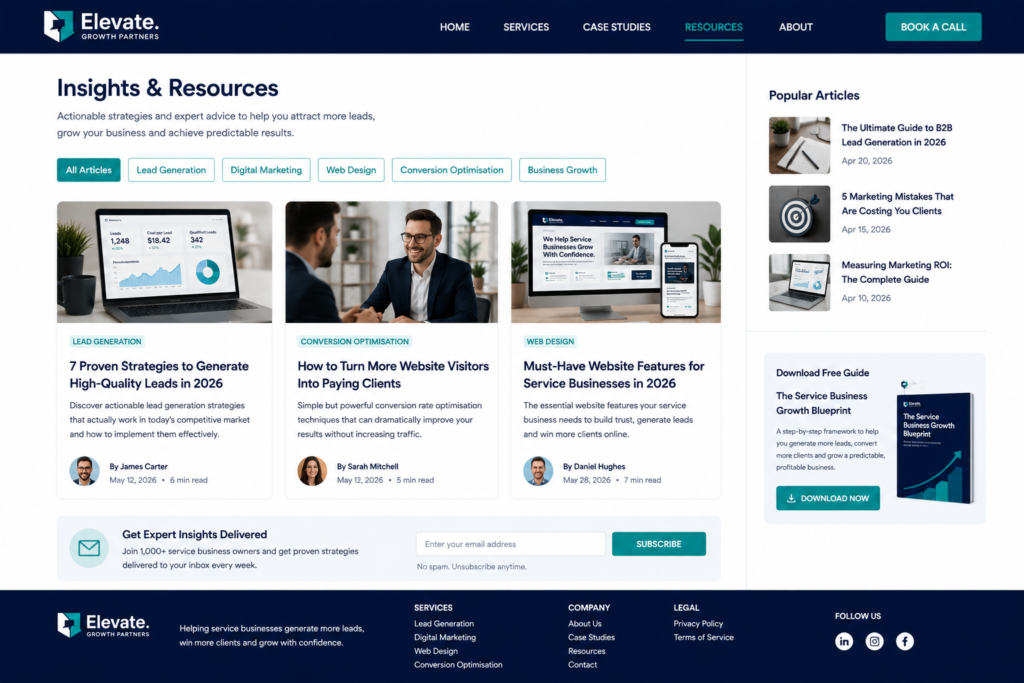
Feature 7: A Blog and Resource Section That Builds Authority and Traffic
The majority of people who will eventually hire a service business aren’t ready to hire today. They’re researching. They’re trying to understand a problem. They’re comparing options. They’re building a picture of which providers seem to know what they’re talking about.
A well-maintained blog or resource section serves every one of those needs simultaneously — while building the organic search visibility and AI citation rate that brings those researchers to you in the first place.
For service businesses, the content that performs best isn’t generic industry news or “tips and tricks” roundups. It’s content that directly addresses the specific questions your ideal clients are asking when they’re trying to solve the problem you solve. Not “marketing tips for businesses” — “how to generate leads from a professional services firm website” or “what to ask a digital agency before you sign a contract.”
The more specifically you serve a defined audience, the more authority you build within that audience — and the more referrable your content becomes to both human readers and AI search tools that are assembling answers to those specific questions.
With Google AI Overviews appearing in 13% or more of searches and far higher for informational and commercial investigation queries, structured data has never mattered more. Google’s AI systems use schema markup as a strong signal when constructing AI Overview summaries — pages with well-formed Article schema are significantly more likely to be cited.
A blog without an Article schema implementation is leaving that citation opportunity on the table. Every blog post should have Article schema with author attribution, publication date, and last-modified date — signals that tell both Google and AI tools that this is current, human-authored, expert content.
Feature 8: A Contact Page That Converts, Not Just Collects
The contact page is where the conversion either happens or falls apart. For most service businesses, it’s a page that collects information rather than one designed to convert a hesitant prospect into a confirmed enquiry.
The difference between a contact page that converts and one that doesn’t comes down to a few specific elements.
Multiple contact options. Different people prefer different contact methods, and forcing everyone through a single form reduces conversion. Your contact page should offer: a form for those who want to write their enquiry in advance; a phone number for those who want to talk immediately; an email address for those in a sensitive situation who want a paper trail; and a booking link for those who want to skip the back-and-forth and schedule directly.
Context and expectation setting. “What happens after I submit this form?” is a question most contact pages never answer. A brief, specific description of the next step — “We’ll get back to you within two business hours. Your enquiry goes directly to [Name], our [Role], who will reach out personally” — reduces the uncertainty that prevents many visitors from submitting at all.
Reduced form fields. The correlation between form field count and completion rate is consistent across almost all industries: more fields, fewer completions. A contact form for a service business needs name, email or phone, and a brief description of the enquiry. Everything else can be gathered in the discovery call. Keep your forms as short as they can be while still giving you enough information to respond helpfully.
Trust signals adjacent to the form. A brief testimonial, a star rating from Google or Trustpilot, or a “We respond within 2 hours during business hours” statement placed directly next to the form submit button addresses the hesitation a visitor feels in the moment they’re deciding whether to click.
Feature 9: Local SEO Features That Drive Area-Specific Visibility
For service businesses that serve a specific geographic area — whether that’s a city, a region, or a defined service radius — local SEO is often the highest-ROI visibility investment available. And the website features that support local SEO are specific, implementable, and frequently overlooked.
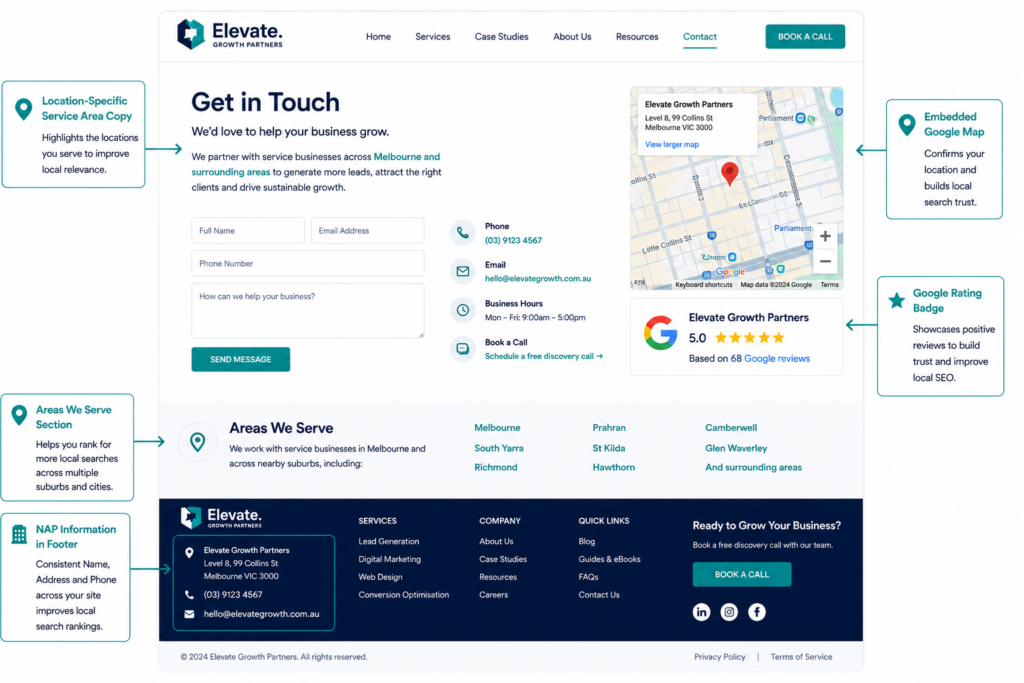
LocalBusiness schema is critical for service-area businesses targeting location-based AI queries. AI platforms use LocalBusiness schema to match content with location-based queries like “best [service] near me.” Without it, AI systems may favour competitors with explicit location markup.
What local SEO features look like on a service business website:
Location-specific service pages. If you serve multiple areas, a dedicated page per area (“Digital Marketing Agency in Manchester,” “HR Consulting Services in Leeds”) with location-specific content — not the same page with the city name swapped — signals local relevance to search engines and AI tools for area-specific queries.
Consistent NAP (Name, Address, Phone number) across every page. Your business name, address, and primary phone number should be identical on your website, your Google Business Profile, your directory listings, and your schema markup. Inconsistency between these sources introduces uncertainty that both search engines and AI tools penalise when assessing which businesses to recommend.
Embedded Google Map on the contact page. A visible, interactive map embed not only helps visitors find you — it signals to Google that your location data is accurate and current.
Location-specific testimonials. “We helped a law firm in Birmingham reduce client acquisition costs by 31%” is more locally persuasive and more locally relevant to search signals than a generic testimonial with no geographic context.
Google Business Profile integration. Your website and your Google Business Profile should work together, not independently. Consistent information, reciprocal links, and service descriptions that match between the two strengthen your local entity authority with both Google’s traditional ranking systems and its AI features.
Feature 10: Website Speed and Core Web Vitals That Protect Your Rankings
This is the feature that feels the least exciting and carries some of the most serious commercial consequences when it’s wrong.
Google’s Core Web Vitals — the set of performance metrics that directly influence search ranking — measure three things: Largest Contentful Paint (LCP), which is how fast the main content loads; Interaction to Next Paint (INP), which measures responsiveness to user interactions; and Cumulative Layout Shift (CLS), which measures visual stability as the page loads.
A service business website that fails Core Web Vitals is simultaneously losing search ranking position and losing the visitors who do arrive to slow load times. 53% of mobile visitors abandon a page that takes more than three seconds to load. Page speed with approximately one-second load times materially raises conversion rates.
The targets: LCP under 2.5 seconds; INP under 200 milliseconds; CLS below 0.1.
The most common speed killers on service business websites:
Uncompressed images. Large JPEG or PNG files used as hero images are one of the single biggest contributors to slow page loads. Compress to WebP format, set explicit dimensions, and implement lazy loading for images below the fold.
Unused plugins and scripts. WordPress sites in particular accumulate plugins over time — each one loading scripts and stylesheets that add to page weight. Audit active plugins quarterly and remove anything that isn’t earning its place.
Undeferred third-party scripts. Live chat tools, analytics pixels, social media embeds, and heatmap tools all load scripts that can block page rendering. These should be deferred to load after the main content, not before it.
No Content Delivery Network. For sites serving visitors across different geographic regions, a CDN dramatically reduces load times by serving content from servers geographically close to the visitor. For most service businesses, this is a hosting-level setting, not a development project.
Feature 11: Clear Navigation That Serves the Visitor’s Journey
Navigation design is one of the most consequential and most frequently overthought elements of a service business website. The goal of navigation isn’t to showcase everything the business does — it’s to help the right visitor find what they’re looking for quickly, and to guide visitors who don’t know exactly what they’re looking for toward a decision.
Most service business navigation fails in one of two ways. It’s either too sparse — a minimalist menu with three items that tells returning visitors nothing and new visitors less — or it’s overcrowded with every sub-service, team page, industry page, and resource in a single mega-menu that overwhelms rather than guides.
What works: A primary navigation of five to seven items maximum, ordered by the priority of the visitor journey rather than the priority of the business’s internal structure. Services or solutions first. About or team second. Resources or insights third. Contact last — because contact isn’t the second thing a first-time visitor wants; it’s the conclusion of a journey that needs to happen first.
Sticky navigation that remains visible as the visitor scrolls. A contact or booking CTA visible at all times in the navigation bar. A mobile hamburger menu that’s fast to open, easy to navigate, and doesn’t hide the most important pages behind multiple taps.
Breadcrumb navigation on interior pages. This isn’t just a UX feature — breadcrumbs with BreadcrumbList schema markup help both search engines and AI tools understand the hierarchical structure of your content, which improves both crawlability and the accuracy of AI-generated representations of your site.
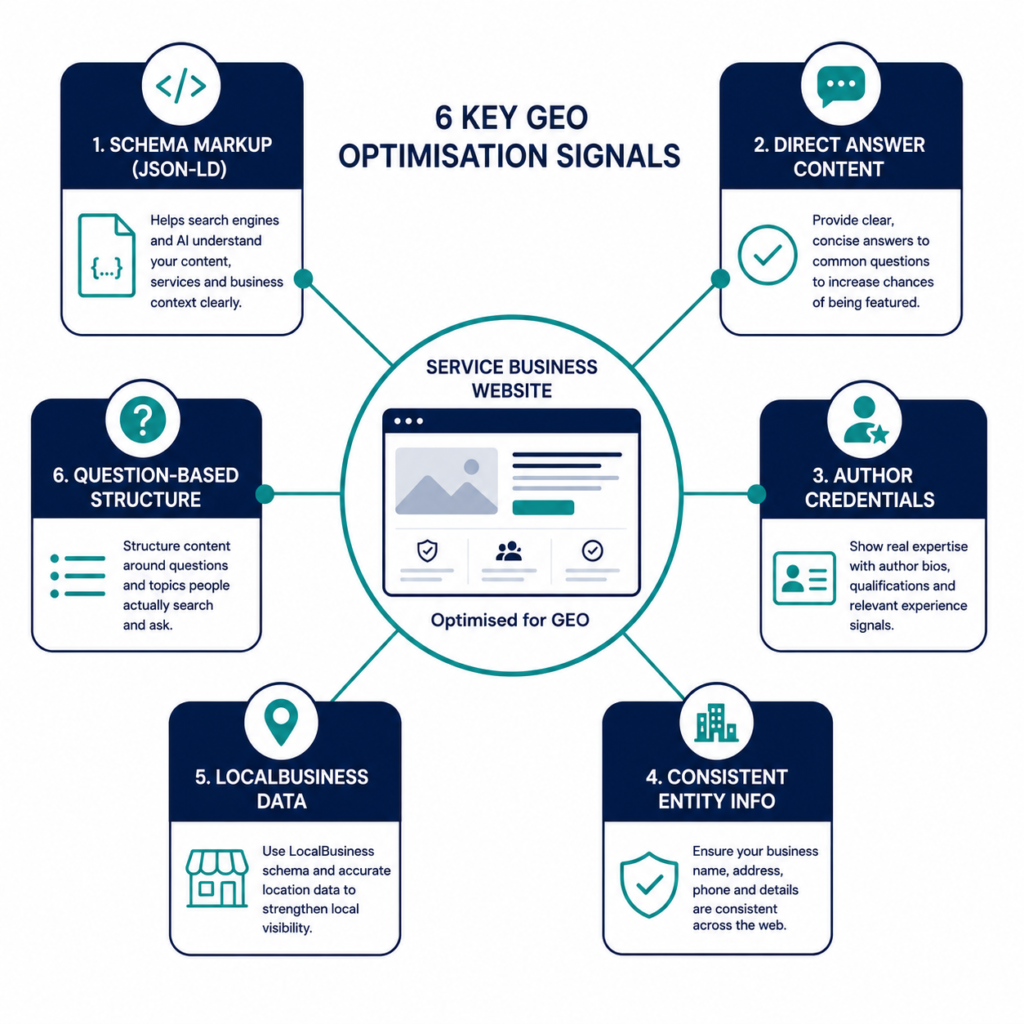
Feature 12: GEO Optimisation Features — Built for AI Search Visibility
Structured data represents much more than simple technical markup. It constitutes the bridge between your content and artificial intelligences that are redefining the search experience. Pages with structured data get 30% more clicks compared to standard results.
GEO (Generative Engine Optimisation) is the practice of building your website so that AI tools — ChatGPT, Perplexity, Google AI Mode, Bing Copilot — can accurately understand, represent, and cite your business. For service businesses, this is increasingly the layer between search visibility and lead generation, because AI tools are now a primary research channel for many buyer categories.
The website features that support GEO visibility are specific and buildable:
Structured, question-based content. Service pages and blog posts written to directly answer specific questions — in the first paragraph, not buried in the fifth — map directly onto how AI tools retrieve and cite content. “What does a website audit include?” answered clearly and specifically in the first 100 words of your services page is far more citable than a paragraph that gradually approaches the answer.
Schema markup (as documented at the top of this article). LocalBusiness, Service, Article, Review, and Author schema are the most important types for service businesses. They give AI tools machine-readable context that reduces ambiguity and increases the likelihood your content is accurately understood and cited. AI Mode now uses structured data for entity resolution and claim verification during answer synthesis.
Author profiles with credentials. Named authors with linked professional profiles and relevant credentials tell both Google’s EEAT systems and AI tools that the content is created by accountable, verifiable experts — not an anonymous content factory.
Consistent entity information. Your business name, service descriptions, location, and key personnel should be consistent across your website, Google Business Profile, industry directories, LinkedIn, and any press mentions. This consistency builds entity confidence — the degree to which AI systems are certain enough about who you are to cite you with confidence.
An “About” page that AI can quote. A clear, specific, factual description of what your business does, who you serve, and what makes your approach distinctive — written in one or two direct paragraphs — gives AI tools something they can accurately reproduce when referencing your business. Vague positioning (“a full-service agency committed to results”) is unquotable. Specific positioning (“a B2B lead generation consultancy specialising in professional services firms in the UK, founded in 2019, with a team of eight strategists”) is citable.
Common Mistakes That Undermine Website Performance
Even well-resourced websites built by capable agencies routinely contain the same avoidable problems:
Generic stock photography throughout. Stock images that clearly aren’t your team, your office, or your work signal inauthenticity immediately. Visitors process this faster than they process the copy. Commission professional photography of your actual business.
Contact forms with too many required fields. Every field beyond the minimum necessary for an initial response reduces form completion rate. Four fields maximum. Everything else gets gathered in the discovery call.
No clear primary CTA on interior pages. Service pages that end without a specific call to action rely on the visitor’s initiative to find the contact page. Most don’t. Every page needs a clear next step built in.
Testimonials page instead of testimonials throughout. A dedicated testimonials page that nobody navigates to is wasted social proof. Place relevant testimonials on the pages where they do the most work — service pages, the homepage, and adjacent to every CTA.
Ignoring page speed until after launch. Performance issues discovered post-launch are significantly more expensive to fix than those addressed during development. Build Core Web Vitals targets into your development brief, not your post-launch punch list.
No schema markup. Only 12.4% of domains are leveraging structured data. For a service business targeting local and AI search visibility in 2026, this is a competitive gap that costs rankings, citations, and leads daily.
Real Business Examples: What These Features Look Like in Practice
A Solicitor’s Firm That Doubled Enquiries Without More Traffic
A regional solicitors’ practice had solid organic traffic but a conversion rate sitting at 0.8% — well below the 3% benchmark for service business sites. The traffic wasn’t the problem. The site was.
After an audit, the issues were clear: no value proposition in the hero section (just the firm name and a photo of their building), social proof buried on a separate page nobody visited, a contact form with nine required fields, and no mobile optimisation.
The redesign focused on conversion fundamentals: a specific value proposition in the hero (“Employment solicitors for individuals and SMEs in the East Midlands — no-obligation initial call”), a key testimonial directly below the hero, a streamlined four-field contact form, and a Calendly booking widget on every service page. No additional traffic. Conversion rate went from 0.8% to 2.9% in ten weeks.
A Consulting Firm That Made AI Search a Lead Channel
A management consulting firm noticed that queries relevant to their core service areas were increasingly being answered by ChatGPT and Perplexity without citing their business — despite the fact that their content was strong and their rankings were solid.
After implementing LocalBusiness and Article schema across the site, rewriting service pages to lead with direct answers, adding named author profiles with linked LinkedIn profiles, and building a comprehensive FAQ section — their business started appearing in AI-generated responses for relevant queries within eight weeks. A tracked uptick in direct traffic from ChatGPT referrals was confirmed in GA4 within three months.
A Marketing Agency That Fixed Mobile and Gained Back Lost Leads
A digital marketing agency noticed a significant divergence between their desktop and mobile conversion rates — desktop was converting at 4.1%, mobile at 1.1%. Given that 68% of their traffic was mobile, the commercial implication was significant.
After a mobile-specific audit, the problems were identified: a hero image loading in 6.2 seconds on mobile, CTA buttons with tap targets under 30px, and a contact form that required twelve fields and was almost impossible to complete on a phone keyboard. Fixing these three issues alone — image compression, button sizing, and form simplification — increased mobile conversion rate to 2.6% within six weeks.
Expert Observations: What We See Consistently Across Service Business Websites
A few patterns that appear across the service business sites we’ve worked with that aren’t always captured in standard best-practice guidance:
The best-performing service pages are written for the client, not the search engine. Ironically, pages written for real people — addressing their specific situation, in their language, about their outcomes — also tend to rank better and be cited more frequently by AI tools. The “write for humans” principle isn’t just good copywriting. It’s increasingly the right SEO and GEO strategy.
The gap between average and excellent is almost never about design. The service business sites converting at 5% and above don’t look dramatically different from those converting at 1.5%. The difference is in the features: clearer value proposition, more strategically placed social proof, faster mobile load times, and a booking mechanism that removes friction. Design sets the first impression. Features determine whether that impression converts.
Schema markup is still only used by a small minority. Only 12.4% of domains use any form of structured data. For service businesses competing in local and AI search in 2026, implementing LocalBusiness, Service, Article, and Review schema is one of the clearest competitive advantages available — because most competitors haven’t done it.
Contact pages are the most under-optimised pages on most service business sites. They receive some of the highest-intent traffic on the site — visitors who have already decided they want to get in touch — and most service businesses treat them as a formality rather than a conversion opportunity.
Conclusion: Build for the Visitor Who’s Ready to Buy
The service business websites that generate consistent, qualified leads in 2026 share a common quality: they’re built for the visitor who’s ready to make a decision, not the visitor who might be impressed.
Every feature on this list exists to serve one goal — making it as easy as possible for the right visitor to take the next step with confidence. Clear value proposition, strategically placed trust signals, friction-free booking, fast mobile performance, and the technical infrastructure of schema markup and GEO optimisation that extends your visibility into AI search.
None of these features requires an enterprise budget. All of them require intentional decisions — in the brief, in the build, and in the ongoing management of a site that’s treated as a commercial asset rather than a brochure.
The gap between a service business website that generates leads reliably and one that doesn’t is rarely about aesthetics. It’s about whether the right features are in the right places, working together, in service of the visitor’s journey and the business’s commercial goals.
Audit your site against this list. Find your three biggest gaps. Fix those first. Then keep going.
Have a service business website that’s underperforming? The most valuable conversation you can have right now is an honest audit — not of what the site looks like, but of how it performs against the features that drive conversion, trust, and visibility. The list above gives you the framework to start that audit yourself, today.
Frequently Asked Questions
Q: What are the most important website features for a service business? The highest-impact features are: a clear value proposition above the fold with a single primary CTA, verified social proof placed adjacent to every CTA and on every service page, a mobile-optimised layout loading in under 2.5 seconds, an integrated booking or enquiry system that removes friction, LocalBusiness and Service schema markup for search and AI visibility, and author-attributed content with real team profiles that build EEAT credibility.
Q: How fast should a service business website load? Google’s Core Web Vitals targets are the performance benchmark: Largest Contentful Paint under 2.5 seconds, Interaction to Next Paint under 200 milliseconds, and Cumulative Layout Shift below 0.1. 53% of mobile visitors abandon pages taking more than three seconds to load. Every second of delay reduces conversion rate materially and negatively affects your search rankings.
Q: Does a service business website need schema markup? Yes. LocalBusiness schema, Service schema, Review schema, and Article schema with author attribution are all important for service businesses in 2026. They help Google, Bing, and AI tools like ChatGPT and Perplexity accurately understand and represent your business. Pages with structured data receive 30% more clicks on average. Only 12.4% of domains currently use any structured data — making it a significant competitive advantage for those who implement it correctly.
Q: What makes a service business website trustworthy enough to convert? Trust is built through: real photography of your actual team, named and attributed testimonials with specific outcomes, case studies with measurable results, professional accreditations displayed prominently, SSL security and a clear privacy policy, consistent business information across all pages, and trust signals placed adjacent to every CTA. Adding testimonials near a CTA can increase conversions by 15–34%.
Q: How many CTAs should a service business website have? Every key page should have at least one above-the-fold CTA and one mid-page CTA. The primary CTA should be consistent across the site and aligned with your primary conversion goal. Avoid more than two or three competing CTAs per page — multiple competing options create decision paralysis and reduce conversion rate. Simplicity and clarity in CTA design consistently outperforms variety.
Q: What is GEO optimisation and why does it matter for service business websites? GEO (Generative Engine Optimisation) is the practice of structuring your website so AI tools — ChatGPT, Perplexity, Google AI Mode — can accurately understand and cite your business. It matters because AI search is now a primary research channel for buyers, and visibility in AI-generated responses is increasingly where buyer consideration sets are formed. For service businesses, GEO means: direct answer content on service pages, LocalBusiness and Article schema, named author profiles with credentials, and consistent entity information across your digital presence.
Q: Should a service business have an online booking system? Yes. 70% of clients prefer to book appointments online. An embedded booking system like Calendly or Acuity on your service pages and contact page removes the back-and-forth of enquiry emails and captures leads 24/7. It also sends a professional signal — the prospect can see your availability, choose a time, and confirm a conversation without waiting for a response. For high-value services where a direct booking isn’t appropriate, a four-field contact form with a clear response time commitment is the next best option.