
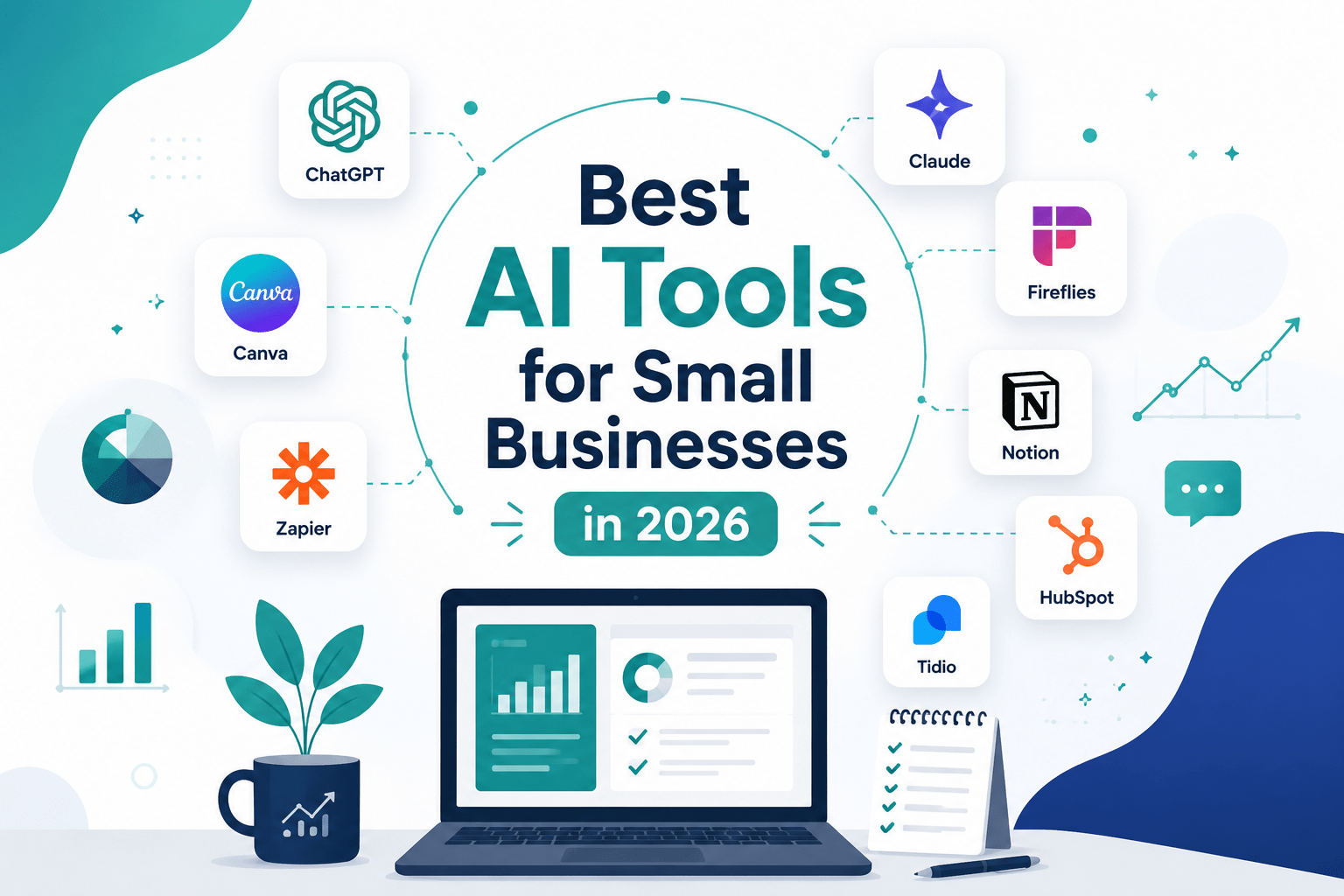
Discover the best AI tools for small businesses in 2026 — covering content, automation, customer service, design, and productivity. Real tools, real results, honest advice.
That’s the conversation that’s happening thousands of times a day across small businesses in every sector. Not the breathless enthusiasm of early adopters — the measured, slightly rueful acknowledgement of business owners who waited longer than they needed to.
The AI tool landscape has shifted fundamentally. What was an experimental technology in 2023 is now an operational advantage in 2026. 63% of AI-using small businesses use AI as part of their daily workflows, meaning it has become embedded in regular operations rather than used occasionally. The average small business now uses a median of five AI tools, combining assistants, marketing platforms, and automation tools.
The businesses that moved early are now widening the gap. But the tools have also become genuinely accessible — most have free tiers, most require no technical background, and most deliver measurable value within the first week of use. The barrier to entry is now attention and intention, not budget or expertise.
This guide covers the AI tools that actually move the needle for small businesses in 2026 — what each one does, who it’s best suited for, what it costs, and the honest view of where it delivers and where it doesn’t.
The State of AI Adoption in Small Business: Where We Actually Are
Before the tools, the honest picture of where small businesses stand with AI in 2026 — because the numbers tell a more nuanced story than most coverage acknowledges.
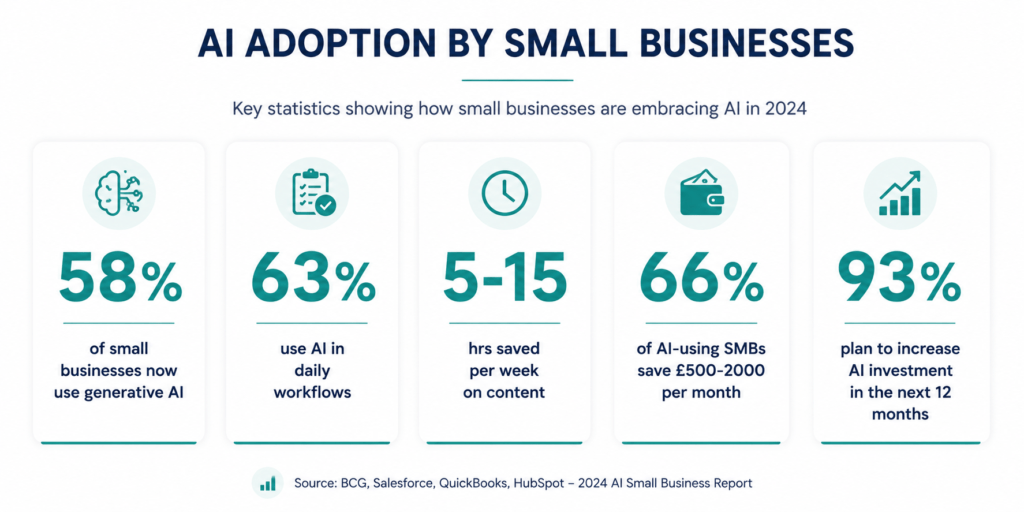
Usage of generative AI among small firms jumped from approximately 40% in 2024 to 58%+ in 2026. 68% of US small businesses now use AI regularly, and 96% of small business owners plan to adopt AI technologies.
Those headline adoption numbers are real — but they conceal a more important data point. Only 8% of businesses reach advanced AI adoption levels. Most remain in early or experimental stages, investing in one or two use cases without a broader strategy for how AI fits into their operations.
The gap isn’t between businesses using AI and those not using it anymore. It’s between businesses using AI strategically — with embedded tools, measured outcomes, and a clear sense of where it adds value — and businesses experimenting with it occasionally without real integration into how the team works.
AI-using small businesses save 5 to 15 hours per week on content work. At a conservative $25/hour, that’s $6,500–$19,500 in reclaimed time annually. 66% of SMBs using AI save $500–$2,000 per month, and 58% recover 20 or more hours monthly.
That’s not the economics of a novelty tool. That’s the economics of a fundamental operational change.
80% of SMBs that use AI believe it is now commonly used among their peers in commerce — but only a third of non-users agree with that assessment. Some small businesses may be significantly underestimating how quickly their competitors are building an advantage.
That perception gap is worth sitting with. If you’re not yet using AI tools systematically, the businesses in your market who are have likely already absorbed the learning curve and are now compounding the advantage week by week.
Here’s what they’re actually using.
How to Think About Building Your AI Tool Stack
Before naming tools, a framework — because the most common AI tool mistake isn’t choosing the wrong tool. It’s choosing too many tools too fast, or choosing tools that solve problems you don’t actually have.
The average small business that uses AI most effectively runs five tools. But those five tools weren’t adopted simultaneously. They were added incrementally, each one integrated into a real workflow before the next was introduced.
Start with your biggest time drain. Not the most interesting use case for AI — the one where your team loses the most hours to repetitive, predictable work. If that’s content creation, start there. If it’s meeting follow-up, start there. If it’s answering the same customer questions repeatedly, start there. Pick one problem, find the right tool, use it daily for two weeks, and measure the time saved before adding the next tool.
Think in layers, not categories. The AI tool stack that serves a small business well has three layers: a core AI assistant (ChatGPT or Claude) that handles most general tasks; specialist tools for the workflows where a general assistant isn’t optimal (Canva for design, Surfer for SEO content, Otter for meetings); and an automation layer (Zapier or Make) that connects your tools and removes the manual work between them.
Measure what you were spending time on before. “It feels faster” is not a measurement. Pick one metric per tool — time spent on email drafts per day, time taken to produce a blog post, time spent on post-meeting documentation — and track it. Without measurement, you can’t justify the investment, can’t identify the tools that aren’t working, and can’t make the case to bring the rest of your team onboard.
Free tiers are real starting points, not demos. ChatGPT’s free plan, Canva’s free plan, Notion’s free plan, HubSpot’s free CRM, Fireflies’ limited free tier — these are genuinely functional for small businesses at early stages. Start free, prove the value in your specific workflow, then upgrade when the paid features become necessary.
Category 1: AI Assistants — The Core of Your Stack
ChatGPT (OpenAI)
Best for: General business tasks, content creation, coding, research, customer communication drafts, brainstorming
Pricing: Free plan available; ChatGPT Plus from $20/month; Team plan from $25/user/month
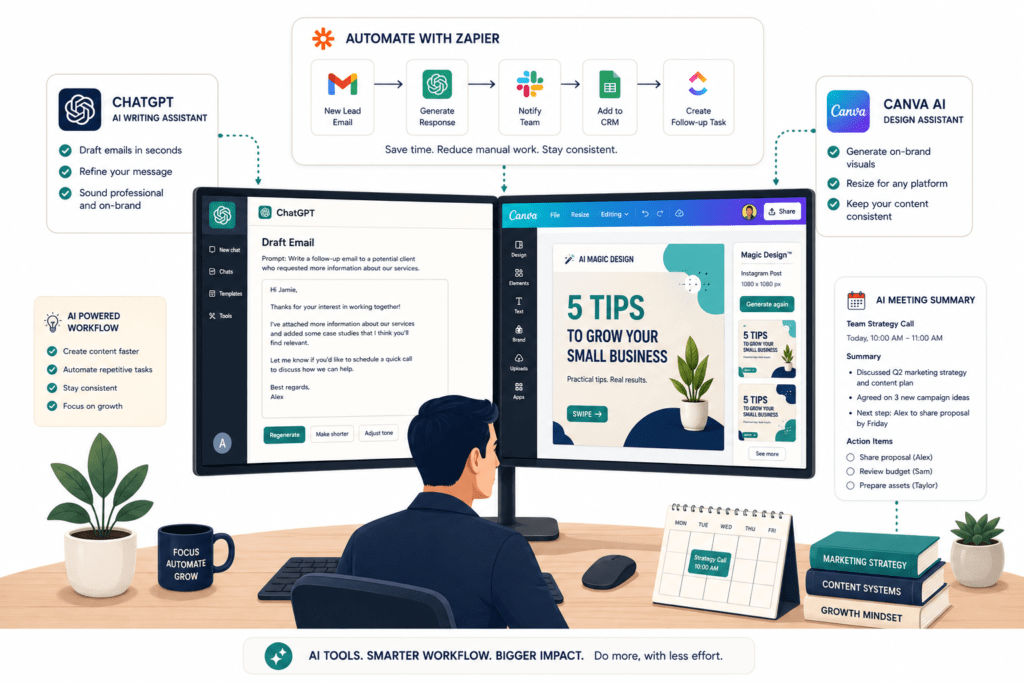
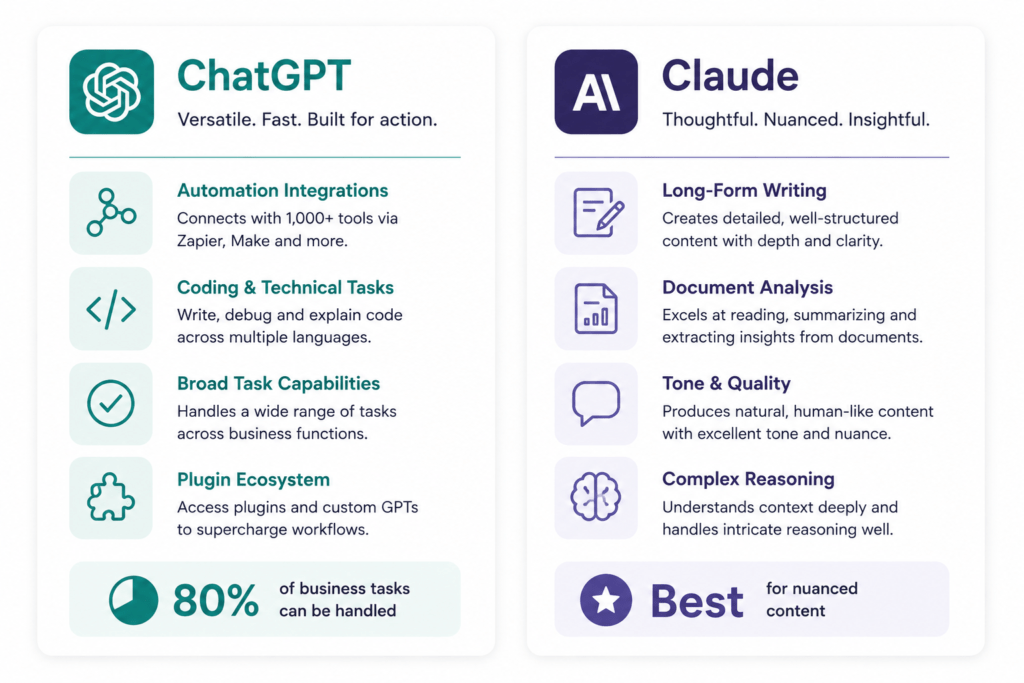
ChatGPT remains the most widely deployed AI assistant in the world and the natural starting point for small businesses new to AI. It handles the broadest range of tasks — writing, analysis, coding, research, summarisation, translation — with a consistent, accessible interface and the largest integration ecosystem of any AI assistant.
For small businesses, the most immediately valuable use cases are: drafting and editing emails and proposals, generating first drafts of blog posts and social content, summarising long documents or research, brainstorming product names and campaign ideas, and answering technical questions without searching through documentation.
ChatGPT helps sales teams draft personalised emails and research prospects before meetings, and drafts campaigns, blog posts, and social copy across formats.
The paid plan’s custom GPTs are particularly useful for small businesses: you can create a GPT trained on your brand voice, your service descriptions, and your tone guidelines, so that every team member’s AI outputs are consistent with your brand — without needing to explain the brief every time.
Where ChatGPT leads Webflow in the platform comparison that matters here: ChatGPT has a stronger plugin and tool ecosystem, better for automations and third-party integrations, and for automation-first workflows, it currently wins that category.
The honest limitation: ChatGPT’s outputs require editing. They’re strong first drafts, not finished copy. The more specific your instructions — the more context you give about your audience, your purpose, your tone, and what you’ve already tried — the better the output. Generic prompts produce generic results.
Claude (Anthropic)
Best for: Long-form content, document analysis, nuanced writing, complex reasoning, customer-facing communication
Pricing: Free plan available; Claude Pro from $20/month
Claude is the AI assistant most consistently recommended for work where writing quality, tone precision, and analytical depth matter. Claude excels at writing code, analysing complex documents, and handling nuanced tasks that require deeper reasoning. It’s strong for technical work and long-form content that needs to maintain consistency.
For small businesses, Claude’s distinct advantages show up in specific contexts: writing content that doesn’t sound like it was produced by an algorithm, analysing contracts and lengthy documents, producing research syntheses that are accurate and well-reasoned, and handling customer communications where tone is commercially important.
Claude is better for customer-facing email writing based on tone quality. Its outputs are warmer, more natural, and less reliant on template phrases that customers increasingly recognise as AI-generated. For enterprise customer communication, high-ticket client emails, or complaint handling, Claude performs better.
The practical recommendation for most small businesses: use ChatGPT for tasks where volume, speed, and integration matter; use Claude for tasks where the quality of the writing itself is what the customer or prospect will judge. Many small businesses find their optimal approach uses both — different tools for different jobs, not one tool for everything.
ChatGPT Plus or Claude Pro — both cost under £20 per user monthly, require no integration, and cover 80% of real-world needs: document drafting, code review, brainstorming, customer inquiry response.
Category 2: Content and Design — Producing More Without a Bigger Team
Canva AI (Magic Studio)
Best for: Social media graphics, presentations, marketing materials, logo creation, video content
Pricing: Free plan available; Canva Pro from $12.99/month
Canva has been a small business staple for years. The AI layer built on top of it — branded as Magic Studio — has transformed it from a design tool into a content production system.
Canva’s AI-powered Magic Studio creates logos, social media graphics, and videos in seconds. No design skills needed. For small businesses producing regular marketing content without a designer on staff, this is one of the most immediately impactful tools in the stack.
The AI features that deliver real-world value for small businesses: Magic Design generates branded templates from a prompt; Magic Write produces copy directly inside the design canvas; Background Remover handles product photography cleanup; and the Brand Kit feature maintains consistent colours, fonts, and logos across everything your team creates, regardless of who creates it.
For social media specifically — where a small business might need to produce five to ten distinct pieces of visual content per week — Canva AI reduces the time per piece dramatically. Content that would take an hour without design skills takes 15 minutes with Canva AI guiding the layout and copy generation.
The honest limitation: Canva AI produces good, consistent design — not exceptional, distinctive design. For brand-defining creative work, you still need a designer. For the week-to-week social media posts, email headers, and presentation slides that constitute most small business content needs, Canva AI is more than adequate.
Surfer SEO
Best for: Writing blog content that ranks in Google, optimising existing pages, content planning
Pricing: Essential plan from $99/month; Scale from $219/month
Surfer sits at the intersection of content creation and SEO — it analyses the top-ranking pages for any keyword and tells you, in real time as you write, exactly what your content needs to include to compete: the right word count, the topics to cover, the questions to answer, the semantic terms to use.
For small businesses investing in content marketing, Surfer removes the guesswork from SEO content. Instead of writing and hoping, you write with a real-time score telling you whether you’re on track. Content produced with Surfer guidance consistently outperforms content written without it in organic search rankings.
The Content Editor feature works as a Google Docs-like writing environment with Surfer’s scoring system overlaid. You write the content, the tool scores it, you adjust until it’s competitive. It also integrates with ChatGPT and Claude through the API, meaning you can use an AI assistant to produce the draft and Surfer to verify and optimise it — a content workflow that would have required a dedicated SEO specialist two years ago.
The honest limitation: Surfer is more expensive than most small business AI tools and requires a higher level of content marketing commitment to justify. If you’re publishing one blog post per quarter, Surfer isn’t worth the investment. If you’re publishing weekly with content as a genuine lead generation strategy, it pays for itself in ranking improvements.
Category 3: Automation — The Multiplier Layer
Zapier
Best for: Connecting apps, automating repetitive multi-step tasks, no-code workflow building
Pricing: Free plan (limited Zaps); paid from $19.99/month
If there’s one category of AI tool that small businesses consistently underinvest in and subsequently most regret not adopting sooner, it’s automation. Zapier connects over 6,000 apps and now uses AI to suggest automation workflows based on your team’s behaviour patterns.
Zapier connects 6,000+ apps and uses AI to suggest automations based on your behaviour. Automate invoicing, lead capture, email follow-ups, and more without coding.
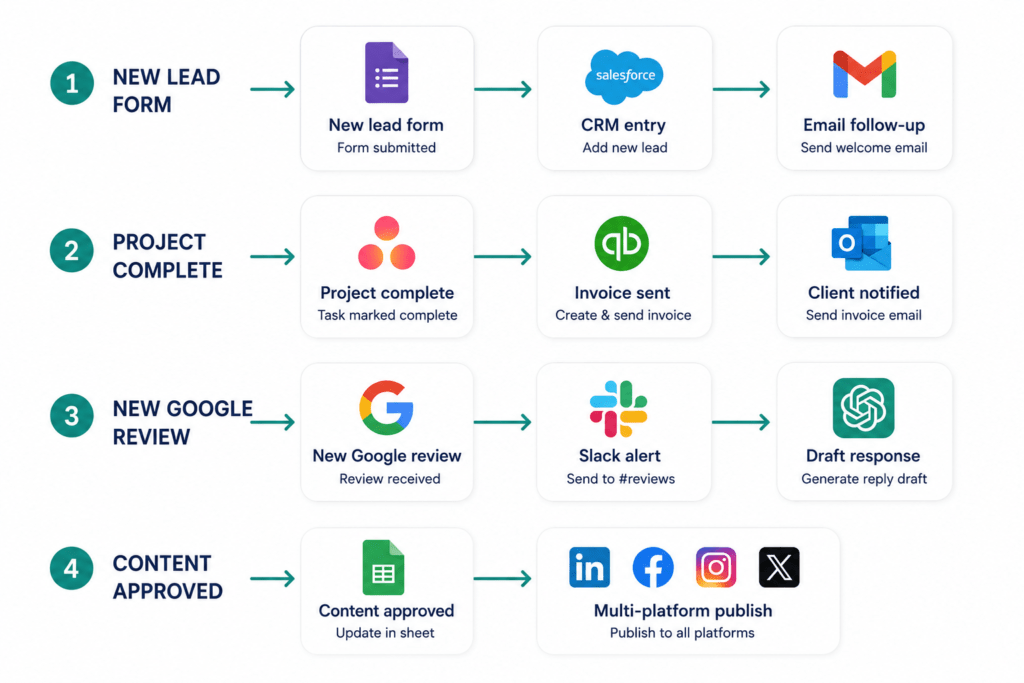
The automations that deliver the most consistent time savings for small businesses: new lead form submission → CRM entry → personalised email follow-up (without anyone touching a keyboard); completed project → invoice triggered → client notification sent; new Google review → team Slack notification → drafted response for approval; social media post scheduled → sent across multiple platforms simultaneously.
Each of these individually saves 10–20 minutes of repetitive human work. Across a week, across a team, the compounding time savings are substantial. Teams in the 2–10 person range typically see the clearest ROI when they pick one automation tool and spend two weeks building three or four core workflows.
Zapier vs Make.com: Zapier is easier to set up for straightforward automations and has more pre-built templates. Make.com (formerly Integromat) is more powerful for complex, multi-step workflows with conditional logic — it has a visual, flowchart-style interface that’s more intuitive for elaborate automations but requires a slightly steeper initial investment to learn. For most small businesses starting out, Zapier first. For businesses with complex operational workflows, Make.com.
Category 4: Customer Service — Handling More Without Hiring More
Tidio
Best for: Website chatbot for customer queries, lead qualification, e-commerce support
Pricing: Free plan; paid from $29/month
Tidio’s AI chatbot — Lyro — handles common customer queries automatically, qualifying website visitors, answering FAQs, processing routine support requests, and escalating to a human only when the query falls outside its training. Tidio is great for e-commerce stores that want fast responses without hiring a bigger support team.
For small businesses where customer service queries follow predictable patterns — “What are your prices?” “Do you cover my area?” “How long does delivery take?” — Tidio resolves those queries 24/7 without any human involvement. The AI learns from your responses and your product/service documentation, improving accuracy over time.
The lead capture function is equally valuable: Tidio can be configured to ask qualifying questions from website visitors (budget, timeline, project type), capture their contact details, and notify your team with a warm lead summary — before a human has been involved at all.
The honest limitation: Tidio’s AI handles routine queries effectively, but anything outside its training produces generic or incorrect responses. The setup investment — training the bot on your specific business, your products, your FAQs, and your escalation logic — determines how well it performs. A poorly configured Tidio bot frustrates customers. A well-configured one impresses them.
Intercom (with Fin AI Agent)
Best for: High-volume customer support, SaaS businesses, businesses with comprehensive help documentation
Pricing: From $39/month (Essential); Fin AI Agent priced per resolution
For businesses with higher support volumes, more complex products, or an existing help centre, Intercom’s Fin AI Agent is a more sophisticated customer service AI solution. Intercom handles high-volume support queries with Fin AI Agent, pulling answers from your Help Centre and escalating to humans only when needed.
Fin reads your entire help centre, your product documentation, and your historical support conversations, then answers customer queries by synthesising the relevant content. Resolution rates for common queries typically reach 60–80% — meaning the majority of support tickets are resolved without a human agent touching them.
For a small business in a growth phase where support volume is increasing faster than headcount, this is one of the clearest ROI calculations in the AI tool landscape: each query resolved by Fin AI is one your team doesn’t need to handle.
Category 5: Meetings and Productivity — Reclaiming the Hours That Disappear
Otter.ai
Best for: Meeting transcription, real-time note-taking, client call documentation
Pricing: Free plan (limited); Pro from $16.99/month; Business from $30/user/month
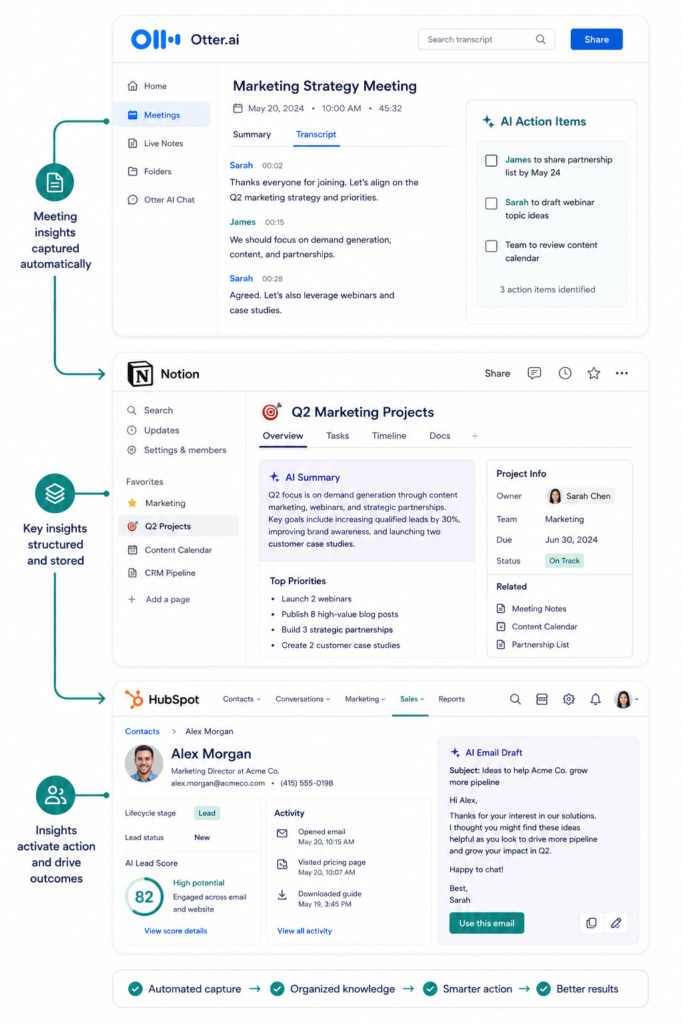
Otter joins your Zoom, Google Meet, or Teams calls and produces accurate transcripts, summaries, and action items in real time.
For small businesses where client calls, team meetings, and discovery sessions represent a significant chunk of the working week, Otter solves a problem that has always existed but was too expensive to address: the documentation gap between what was said in a meeting and what gets captured in notes.
With Otter running, every call is transcribed automatically. The AI summary extracts the key points, decisions, and action items. The full searchable transcript is available immediately after the call ends. For client service businesses — agencies, consultants, accountants, solicitors — this means every client conversation is captured accurately, without anyone spending an hour writing notes from memory.
The time saving is immediate and measurable. Post-meeting documentation that previously took 30–45 minutes takes 5–10 minutes with Otter providing the transcript and summary as a starting point.
Fireflies.ai
Best for: Meeting transcription with CRM integration, searchable conversation history, sales teams
Pricing: Free plan (limited transcriptions); Pro from $10/month; Business from $19/month
Fireflies covers the same ground as Otter with two specific advantages: superior CRM integration (it syncs meeting summaries directly to HubSpot, Salesforce, and other CRMs automatically) and a more powerful search function that lets you query across all your past meeting transcripts. Fireflies integrates with video conferencing platforms to record and transcribe. Its strength lies in its searchability, allowing users to find specific details from past conversations easily.
For sales-led small businesses where tracking what was discussed and promised in client conversations is operationally important, Fireflies’ CRM sync is the more valuable feature. For service businesses where the accuracy of the transcript itself matters most, Otter and Fireflies are closely comparable.
The practical recommendation: If you’re using HubSpot, use Fireflies — the integration removes a manual step that otherwise takes 5–10 minutes per meeting. If you don’t need CRM integration, Otter’s interface and summary quality are slightly more polished.
Notion AI
Best for: Project management, team knowledge base, document creation, meeting notes organisation
Pricing: Free plan (solo); Plus from $10/user/month; AI add-on from $8/user/month
Notion has become the operational backbone for thousands of small businesses — the single place where projects are tracked, documentation lives, meeting notes are stored, and team knowledge is organised. The AI layer built into Notion adds a dimension that transforms it from a passive repository into an active assistant.
Embedded within the Notion workspace, the AI assistant helps organise notes, summarises long documents, generates to-do lists, and brainstorms ideas to keep projects moving.
The most practically valuable Notion AI features for small businesses: summarising a long Notion page into key points before a meeting; drafting a project brief from a set of bullet notes; generating a first draft of a client report from a collection of meeting transcripts; and querying across your entire workspace to find information from past projects.
For small businesses where institutional knowledge — what did we quote that client last year? What was the strategy we agreed on for this type of project? — is currently trapped in individual email inboxes or people’s memories, Notion as a searchable, AI-queryable knowledge base changes how the team operates.
Category 6: CRM and Marketing — AI That Grows Your Pipeline
HubSpot AI (Breeze)
Best for: CRM, email marketing, lead management, sales pipeline, marketing automation
Pricing: Free CRM; paid from $20/month (Starter); higher tiers for advanced features
HubSpot’s AI features — collectively branded as Breeze — represent one of the clearest demonstrations of AI integrated into a tool small businesses are already using rather than added as a separate product. HubSpot’s AI predicts which leads are most likely to convert, drafts personalised emails, and analyses customer behaviour. The free tier alone offers massive value.
For small businesses managing leads and customer relationships, the specific AI features that deliver immediate ROI: Breeze Copilot drafts personalised sales emails from CRM contact data, meaning a prospect email that references their company, their industry, and their likely need takes 90 seconds instead of 15 minutes. Lead scoring AI identifies which contacts in your database are most likely to convert based on their engagement behaviour — so your team focuses attention where it matters most. And the AI content writer produces email campaigns, landing page copy, and social content directly within HubSpot’s marketing tools.
The free CRM with AI features is genuinely functional for small businesses managing under a few hundred contacts. It’s one of the clearest “start free, upgrade when you need to” paths in the AI tool landscape.
Perplexity
Best for: Market research, competitive intelligence, factual business research with citations
Pricing: Free plan; Pro from $20/month
Perplexity positions itself as an AI-powered research engine — distinct from ChatGPT and Claude in that it’s built specifically for retrieving and synthesising current, verified information from the web, with source citations included in every response.
For small business owners who need to answer research questions quickly — competitor pricing, industry trends, regulatory changes, market size data, recent news about a prospect — Perplexity is significantly more reliable than a general AI assistant like ChatGPT for factual queries, because it retrieves information from current web sources rather than relying on training data with a knowledge cutoff.
Practical small business use cases: researching a prospect’s business before a sales call; understanding what competitors are saying about their services; finding current statistics for a proposal or pitch deck; monitoring news in your sector; and answering specific factual questions that need a verifiable source.
The honest distinction: Perplexity for research and fact-finding. ChatGPT or Claude for creating, drafting, and generating. The tools complement each other rather than competing.
The Honest Mistakes Most Small Businesses Make With AI Tools
These are the failure patterns we see consistently — in clients, in the small businesses we talk to, and in how AI adoption typically plays out when it doesn’t deliver the expected returns.
Trying to implement everything at once. Subscribing to eight tools simultaneously and using none of them consistently is worse than using one tool every day. The ROI from AI tools comes from embedded daily use, not occasional access. Pick two tools first. Use them for actual work for a week or two — emails, planning, client calls, content drafts, task management. The useful tools are usually the ones you forget are running because they quietly reduce friction every day.
Using AI for everything without editorial judgement. The businesses getting the most from AI tools are using them to do more faster — not to remove human thinking from their work. AI-generated content that isn’t edited, reviewed, and given a strategic perspective is detectable, generic, and increasingly less effective in a world where AI content is everywhere. The value is in the speed, not in the removal of expertise.
Not connecting the tools. The tools on this list are far more valuable when connected to each other. Even basic integrations — Zapier triggers, Google Workspace connections — multiply the time savings. Not training the team means one person using AI is good, but a whole team using it consistently is much better.
Measuring outputs rather than inputs. The metric that matters is time saved, not content produced. Producing twice as many blog posts at the same quality isn’t a business outcome on its own. Producing the same number of blog posts in half the time — and redirecting that time to client-facing work — is. Track the time freed, not just the volume generated.
Assuming AI tools replace strategy. AI tools execute. They don’t strategise. ChatGPT can write 10 social media posts in five minutes. It can’t decide which social media strategy is right for your specific business, your specific audience, and your specific commercial goals. The strategic thinking that determines what to create, for whom, and why — that remains a human function. AI makes execution faster. It doesn’t make decisions better on its own.
Real Business Examples: What AI Tools Look Like in Practice
A Five-Person Marketing Agency That Freed 12 Hours a Week
A small marketing agency was spending approximately 15 hours per week across the team on first-draft content — blog posts, social copy, email campaigns, ad variations — before any client review or strategic iteration happened.
After implementing ChatGPT with a custom GPT trained on each client’s brand voice and tone guidelines, plus Surfer SEO for content brief generation, first-draft production time dropped from 15 hours to approximately 3 hours per week across the same output volume. The freed 12 hours went into strategy, client management, and business development — the activities that actually grow an agency.
The investment: ChatGPT Team plan ($25/month) and Surfer Essential ($99/month). Total: £97/month. Time saved at £40/hour average team cost: £480/week. Return on investment: immediate and compounding.
A Solicitor’s Practice That Stopped Losing Meeting Notes
A three-partner solicitor’s practice was routinely losing the detail of client meetings — not through negligence, but because the pace of the work left no time for comprehensive note-taking during calls, and post-meeting documentation was done from memory an hour later.
After implementing Otter.ai on all client calls, every conversation was transcribed automatically and summarised within minutes of the call ending. Documentation that previously took 45 minutes per meeting now took 10 minutes of review and editing. Across 20+ client calls per week, this recovered approximately 11 hours of solicitor time — time redirected to billable work.
The investment: Otter.ai Business plan ($30/user/month for three users: $90/month, approximately £71). Time saved at £150/hour solicitor rate: £1,650/week. The ROI conversation took about 45 seconds.
An E-Commerce Brand That Automated Its Customer Service
A small e-commerce business selling homeware was spending 3–4 hours daily across two staff members answering customer service queries — primarily order status checks, returns questions, and product specification queries that appeared in the same forms with different names.
After implementing Tidio with Lyro AI trained on their product catalogue, delivery timelines, and returns policy, approximately 68% of incoming queries were resolved by the chatbot without human involvement. Staff customer service time dropped from 3–4 hours daily to 45 minutes of reviewing escalated queries and approving chatbot drafts for edge cases.
Customer satisfaction scores held steady. Response times improved — the bot answered instantly, 24/7, versus the previous 2–6 hour human response during business hours.
Your Recommended Starting Stack by Business Type
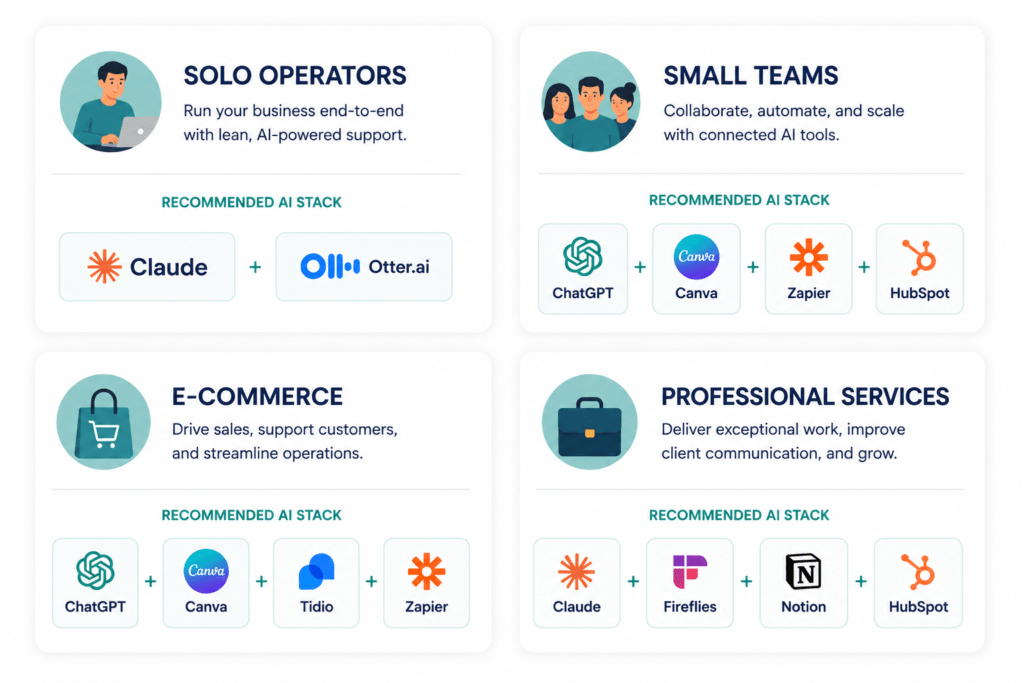
Rather than one generic recommendation, here’s a starting point by business category:
Solo operators and freelancers (1 person): Start with Claude Pro ($20/month) for all content and client communication, and Otter.ai Pro ($16.99/month) for client calls. Total: ~£29/month. Use Canva’s free plan for visual content. That’s the stack that covers 80% of a solo operator’s AI needs.
Small service businesses (2–10 people): ChatGPT Team or Claude Pro for content and general tasks, Canva Pro for visual content, Otter.ai or Fireflies for meetings, HubSpot free CRM with AI, and Zapier’s paid plan (from $19.99/month) to connect everything. Total: ~£80–120/month. This stack should recover 8–15 hours per week across the team within the first month.
E-commerce businesses: ChatGPT or Claude for product descriptions and marketing content, Canva AI for visual content and ad creative, Tidio for website customer service, HubSpot for email marketing and CRM, and Zapier for inventory and order workflow automation. Total: ~£100–150/month depending on Tidio tier.
Professional services (accountants, solicitors, consultants): Claude Pro for document analysis and client communication, Fireflies for client call transcription with CRM sync, HubSpot free CRM, Notion AI for project and knowledge management. Total: ~£70–100/month per user depending on Notion tier. Focus on the document and meeting workflows first — that’s where professional services businesses lose the most time.
Expert Observations: What Actually Separates Successful AI Adoption
After watching small businesses adopt — and occasionally abandon — AI tools across enough client accounts to see the patterns clearly, a few consistent observations:
The businesses saving the most time are using AI for boring tasks, not exciting ones. The glamorous use case is AI writing your thought leadership content. The high-ROI use case is AI handling your email templates, your meeting summaries, your invoice follow-up sequences, and your social post drafts for the week. The boring, repetitive, predictable work is where AI delivers the most consistent return.
Integration is where the value compounds. A standalone ChatGPT subscription that saves an hour a day is useful. ChatGPT connected via Zapier to your CRM, your project management tool, and your email platform — so that outputs automatically flow into the right places without manual copying — multiplies that value several times over. Ignoring integrations is one of the most common limiting factors. Even basic integrations multiply the time savings significantly.
Team adoption requires a standard, not just a subscription. One person on a team using AI tools occasionally is a productivity experiment. A team with shared guidelines for how AI tools are used — which tool for which task, what review process applies, what quality standard is expected before output is used externally — is a team building a genuine operational advantage.
The AI tool landscape will keep changing. Tools that are leading in one capability area in June 2026 may be surpassed by a competitor or a new entrant by Q4. 93% of small businesses using AI plan to continue investing in it in the next year, and 62% report they will increase AI-related spending. The businesses positioned best aren’t the ones locked into a specific tool — they’re the ones that have built the habit of using AI in their daily workflows and can adapt as the tools evolve.
Future Outlook: Where AI Tools for Small Businesses Are Heading
The trajectory is clear and worth understanding for anyone making tool investment decisions now.
AI agents are replacing individual tools. The next frontier beyond AI assistants is AI agents — systems that can plan, execute, and complete multi-step tasks autonomously, rather than producing outputs that humans then act on. Tools like Zapier AI Agents and Make.com’s AI modules are early versions of this. Over the next 12–18 months, small businesses will increasingly deploy AI agents for specific workflows — a customer service agent that doesn’t just answer questions but resolves issues end-to-end, a lead follow-up agent that qualifies and schedules without human involvement.
Vertical AI tools will proliferate. The generic AI assistants (ChatGPT, Claude) are increasingly being complemented by AI tools built specifically for narrow industries — legal AI, medical AI, restaurant AI, accounting AI. These vertical tools outperform generic models on domain-specific tasks because they’re trained on industry-specific data and built around industry-specific workflows.
Pricing will become more complex. The simple monthly subscription model is already evolving — consumption-based pricing (pay per use rather than per user), outcome-based pricing (pay per customer query resolved, per lead qualified), and bundled AI features within existing tools (like HubSpot’s AI) are all changing how small businesses should think about AI cost. Total cost of ownership matters more as the pricing models diversify.
The gap between AI users and non-users will keep widening. Business leaders who moved early are now widening the gap between themselves and those still testing AI. The compounding nature of time savings means that a business that has been using AI tools effectively for 18 months has recovered, potentially, hundreds of hours that went into client-facing work, content, and strategy. That’s not a gap that closes quickly when a competitor starts using AI tomorrow.
Conclusion: The Tools Are Ready. The Question Is Whether You Are.
The most important thing to understand about AI tools for small businesses in 2026 is that the technology has crossed a threshold. These are not experimental tools requiring technical expertise, large budgets, or high tolerance for uncertainty. They are operational tools that deliver measurable, trackable, often immediately obvious time savings and output quality improvements.
The average small business using AI runs a median of five AI tools, combining assistants, marketing platforms, and automation tools. That’s not a technology stack — that’s a working environment. And the businesses running that environment are compressing work that previously took a team a week into the output of a smaller team in less time.
The barrier isn’t the technology. It’s the first step — choosing one tool, applying it to one real workflow, measuring the result, and building from there.
Start with the single biggest time drain in your week. Find the tool that addresses it. Use it every day for two weeks. Measure what changed.
That’s how the stack gets built — not by implementing everything at once, but by proving value one workflow at a time until AI is embedded in how your business operates. Not as a novelty, not as an experiment, but as the operational foundation that lets a small team compete with a much larger one.
Ready to identify which AI tools are right for your specific business? The fastest path to clarity is mapping your biggest time drains against the categories in this guide, choosing one tool per category, and starting with the free tier before committing to a paid plan. The investment is minimal. The opportunity cost of waiting is not.
Frequently Asked Questions
Q: What are the best AI tools for small businesses in 2026? The highest-impact AI tools for most small businesses are: ChatGPT or Claude for content and general tasks; Canva AI for visual content; Zapier or Make.com for workflow automation; HubSpot Breeze AI for CRM and marketing; Otter.ai or Fireflies for meeting transcription; Notion AI for project and knowledge management; and Tidio for website customer service. Most have free tiers. Start with one tool aligned to your biggest time drain rather than multiple tools simultaneously.
Q: How much time can AI tools save a small business per week? AI-using small businesses save 5 to 15 hours per week on content work alone. 58% of SMBs using AI recover 20 or more hours monthly. The exact savings depend on which workflows you automate and how consistently your team uses the tools. Businesses that embed AI into daily workflows — not just use it occasionally — consistently see the largest time savings.
Q: Are there free AI tools that actually work for small businesses? Yes. ChatGPT’s free plan covers most writing and research tasks. Canva’s free plan includes core AI design features. Notion’s free plan works for solo users. HubSpot’s free CRM includes AI features. Fireflies offers limited free meeting transcriptions. A functional starter stack costs nothing if you use free tiers only — though paid plans unlock the features that deliver the most consistent value for growing teams.
Q: What is the difference between ChatGPT and Claude for business? ChatGPT leads on integrations, automation workflows, and breadth of tasks. Claude leads on writing quality, tone precision, document analysis, and long-form content that needs to sound natural and brand-consistent. For automation-first workflows, use ChatGPT. For writing and document-intensive work, use Claude. Most small businesses that use both find they instinctively reach for each in different contexts.
Q: How do I start using AI tools without being overwhelmed? Pick the one workflow in your week that costs you the most time. Find the single tool that addresses it. Use it every day for two weeks before adding anything else. Measure the time saved. The average small business runs five AI tools — but they built that stack incrementally, one proven workflow at a time, not by implementing everything on day one.
Q: Are AI tools suitable for non-technical small business owners? Completely. ChatGPT, Claude, Canva AI, Otter.ai, and HubSpot AI require no technical background, no coding, and no IT support. They’re built for exactly the business owner who wants to get more done without needing a developer. Free tiers let you test before committing, and most tools deliver value from the first session.
Q: How much should a small business budget for AI tools? A functional core stack — ChatGPT Plus or Claude Pro, Canva Pro, Otter.ai Pro, and Zapier’s Starter plan — costs approximately £60–90 per month. For a small team, add HubSpot Starter and the total is around £100–120/month. Against time savings of 20+ hours per month at even £20/hour average cost, the ROI is strongly positive from the first month of consistent use.