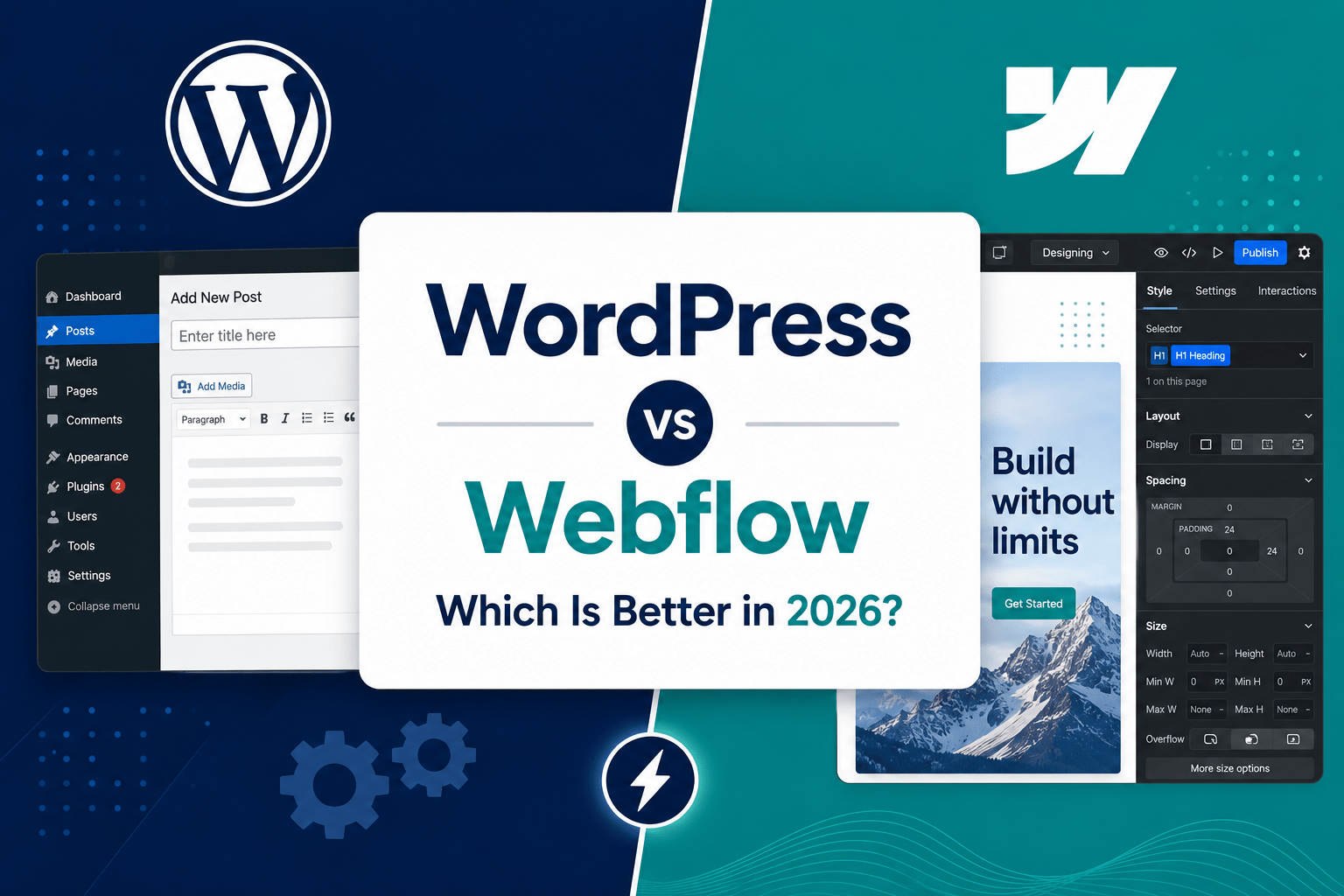
WordPress or Webflow? This honest comparison covers performance, SEO, cost, security, design, and which platform is right for your business in 2026 — from an agency that builds on both.
“We built our first company website on WordPress in 2019. By 2024, we had 47 active plugins, a developer we called every time we needed to change a button, and a PageSpeed score of 38 on mobile. We moved to Webflow. I’ll never go back.”
— Marketing Director, B2B SaaS company, agency client debrief, 2025
“Our content team publishes 30 articles a week. Our e-commerce store has 8,000 SKUs. We tried Webflow. It wasn’t built for what we do. WordPress is still the right answer for us.”
— Head of Digital, media and retail group, platform review, 2025
Both of those conversations are true. And that’s the honest starting point for this comparison: WordPress and Webflow are both genuinely excellent platforms — in the right context. And genuinely wrong choices — in the wrong one.
The WordPress vs Webflow debate has become one of the most polarised in digital marketing. WordPress developers swear by its ecosystem and flexibility. Webflow advocates point to cleaner code, better performance, and the freedom to design without developer bottlenecks. Neither camp is entirely wrong. The more honest answer is that both platforms are genuinely excellent in the right context — and genuinely wrong in the wrong one.
This guide is written for business owners and marketing decision-makers trying to make a clear-headed choice — not for developers loyal to one camp. We’ve built production sites on both platforms. We’ve migrated clients in both directions. We know where each one shines and where each one quietly costs businesses more than they expect.
Here’s the honest version.
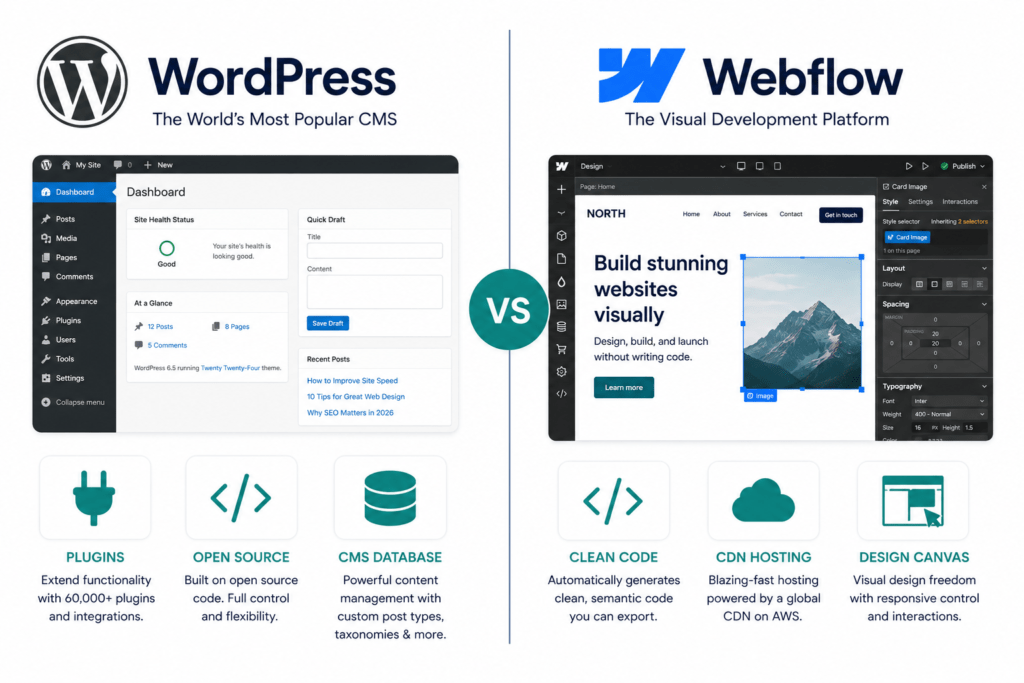
The Quick Verdict — Before We Go Deeper
For the business owners who want the conclusion before the analysis:
Choose WordPress if:
- You run a content-heavy site publishing frequently at scale
- You need complex e-commerce with large product catalogues (WooCommerce)
- You require a specific plugin that has no Webflow equivalent
- You have a technical team to manage ongoing maintenance
- Budget is the primary constraint and you need maximum flexibility at minimum initial cost
Choose Webflow if:
- Design quality and brand expression are strategic priorities
- You want a site that performs well technically without dedicated developer resource
- Your marketing team needs to publish and update content independently
- You’re building a lead generation or marketing-focused site
- You want predictable, all-inclusive hosting and security without plugin management
Neither answer is universally right. The right platform is the one that fits how your team actually works — not the one with the most impressive feature list.
Now let’s go deeper.
Platform Overview: What They Actually Are
WordPress
WordPress is a PHP-based, open-source content management system that powers 43.6% of all websites on the internet and holds a 61.3% CMS market share as of March 2026. Originally built for blogging in 2003, it has evolved into the most flexible website platform ever created — capable of powering everything from a freelancer’s portfolio to enterprise content operations serving millions of monthly visitors.
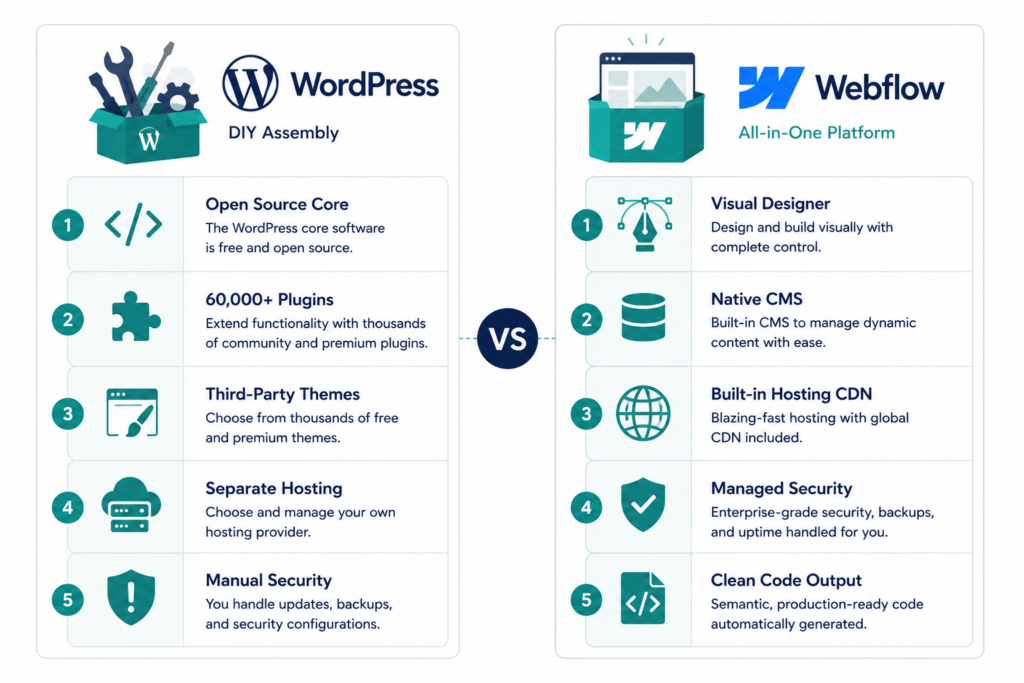
The WordPress model is a kit car. The software is free and open-source. You choose your own hosting, select your own theme, install your own plugins, and assemble the site from components provided by a global ecosystem of developers and vendors. This gives you near-infinite flexibility. It also means the ongoing operational responsibility is yours.
The WordPress plugin repository contains over 60,000 plugins. This is genuinely remarkable — there is almost no website function that doesn’t have a WordPress plugin built for it. It is also the source of most WordPress problems: security vulnerabilities, performance drag, compatibility conflicts, and the maintenance overhead of keeping dozens of third-party components updated and operational.
Webflow
Webflow is a visual web development platform that launched in 2013 and operates as a managed SaaS product. Designers and developers build production-grade websites through a visual editor that outputs clean, semantic HTML, CSS, and JavaScript. Hosting, SSL, CDN delivery via Amazon CloudFront across 275+ global edge locations, and automatic security updates are included in every plan.
Webflow has grown to a 1.2% CMS market share with a 10% compound annual growth rate since 2022, and powers over 493,000 active websites including brands like Upwork, Zendesk, and Lattice. That growth is concentrated in the segment of businesses that care most about design quality, performance, and reducing developer dependency.
The Webflow model is a managed sports car. Higher baseline quality, less configurable than a fully custom build, but significantly more reliable and lower maintenance by design.
Round 1: Performance and Speed
Website performance is a business metric, not just a technical one. A one-second delay in page load reduces conversions by 7%. A 0.1-second improvement in speed increases retail conversions by 8.4%. 53% of users abandon a site if it takes more than three seconds to load. The hosting and infrastructure decisions embedded in your platform choice have direct, measurable commercial consequences.
WordPress Performance
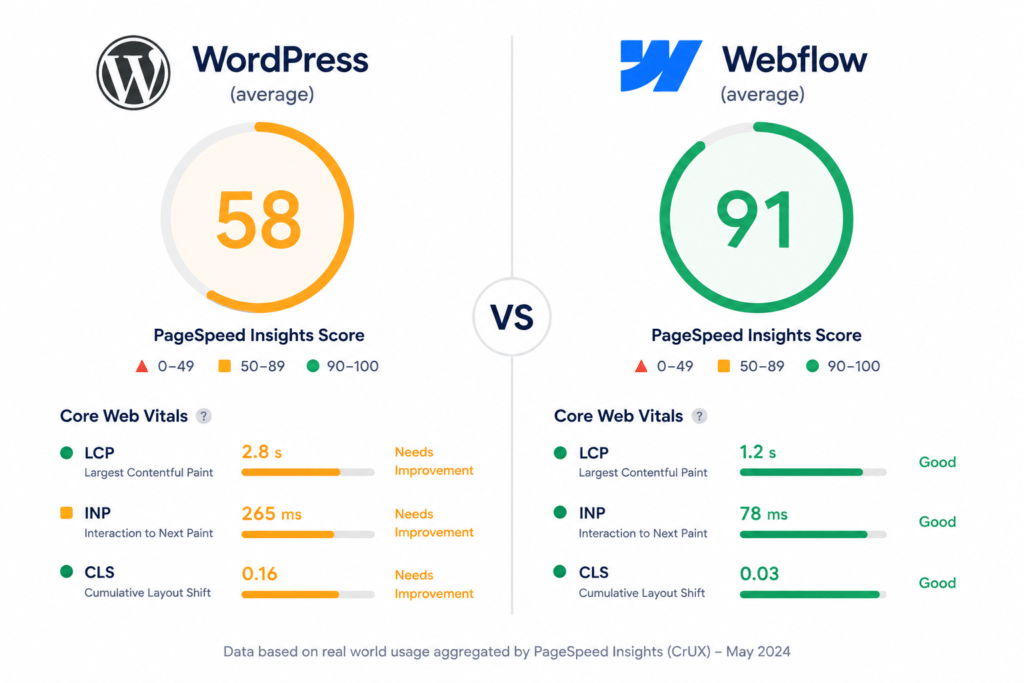
WordPress performance is variable — and that variability is the core issue. A well-configured WordPress site on premium managed hosting, with a quality caching plugin, optimised images, and a lightweight theme, can achieve excellent Core Web Vitals scores. The problem is that reaching and maintaining that performance level requires sustained technical effort.
Speed in WordPress is a constant battle. To get a passing grade on PageSpeed Insights, you often need premium caching plugins (like WP Rocket), a database optimiser, image compression tools, and expensive managed hosting (like WP Engine). Each of these adds cost, adds plugin dependencies, and adds maintenance requirements. A site that achieves excellent performance scores in January can be running at 40% of that performance by June if plugin updates haven’t been managed carefully.
The deeper issue is that WordPress’s plugin architecture means that every additional functionality layer has a performance cost. A site with 40 active plugins is loading 40 third-party scripts, stylesheets, and database queries. The cumulative weight is significant — and it’s invisible until something breaks or a speed test reveals a four-second load time.
Webflow Performance
Webflow’s speed is built in. All sites are hosted on a Tier 1 CDN powered by Fastly and Amazon CloudFront, delivering content from 275+ global edge locations without extra setup or premium hosting plans. Webflow generates clean, minified HTML, CSS, and JavaScript from the visual designer — with no plugin overhead, no database query accumulation, and no theme-layer bloat.
The practical result is that a well-built Webflow site achieves strong Core Web Vitals scores by default — without caching plugins, without performance tuning, and without a developer regularly auditing the plugin stack. Google’s 2026 ranking algorithms prioritise Interaction to Next Paint (INP) and Core Web Vitals. This is where Webflow’s architectural advantage becomes a ranking advantage.
One documented migration case saw a site’s SEO score jump from 55 to 100 and page speed scores double after moving from WordPress to Webflow, with organic traffic tripling within the first month. That’s not a typical result from a content or link building change — it’s a platform-level performance gain.
Winner: Webflow for baseline performance and stability. WordPress can match it with expert configuration, but requires sustained effort to maintain what Webflow delivers by default.
Round 2: SEO Capability
Many SEOs used to claim WordPress was superior simply because of the Yoast plugin. In 2026, this is a myth. Google’s algorithms do not care about plugins — they care about code quality, rendering speed, and user experience.
WordPress SEO
WordPress SEO through Yoast or Rank Math is mature and capable. Both tools support advanced schema markup, breadcrumb navigation, content scoring, readability analysis, and technical audit functions. For SEO specialists running complex schema configurations, multi-site setups, or large-scale content operations, these plugins offer controls and workflows that Webflow’s native tools do not yet fully replicate.
The trade-off is maintenance dependency. Your SEO tooling is only as reliable as the plugins that power it — and plugin conflicts, update issues, and compatibility breaks are genuine operational risks. A Rank Math update that conflicts with your theme can silently break your schema output. You won’t know until you audit.
WordPress also excels for high-volume content publishing. The editorial workflow, content scheduling, category and tag management, and multi-author capabilities make it the stronger choice for businesses publishing at scale — news sites, content-led SaaS companies, media groups, and blog-heavy brands where content operations are a core business function.
Webflow SEO
Webflow manages title tags, meta descriptions, Open Graph data, canonical tags, and XML sitemaps natively — no plugins required. As of January 2026, Webflow’s AI Optimize tool generates meta titles and descriptions through custom prompts, and automated hreflang support handles international SEO without manual code.
The technical SEO baseline — clean semantic HTML, proper heading hierarchy, fast page loads, mobile-first rendering — is built into the platform. There’s no plugin to configure, no compatibility risk, and no performance overhead. The SEO fundamentals that Google’s algorithms reward are present in every Webflow site by design.
The gap compared to WordPress is in schema depth. Structured data in Webflow requires custom code embeds or App Marketplace integrations, which is an area where WordPress plugins offer more built-in configuration depth for teams that need granular schema control. For businesses implementing complex LocalBusiness, FAQ, Product, and Review schema at scale, WordPress with Rank Math remains the more capable solution.
For AI search visibility — the GEO layer that’s increasingly important for discoverability — Webflow’s clean semantic structure, fast performance, and native meta control make it a strong baseline. Neither platform has a native GEO optimisation toolset that removes the need for strategic content decisions, but Webflow’s cleaner code output means AI tools parsing your content for citation have less noise to process.
Winner: Webflow for technical SEO baseline and performance-driven rankings. WordPress for advanced schema tooling and high-volume content SEO workflows. For most small to mid-size businesses, Webflow’s performance advantage produces better real-world results.
Round 3: Design Flexibility and Visual Quality
This is where the conversation gets interesting — and where the two platforms reflect fundamentally different design philosophies.
WordPress Design
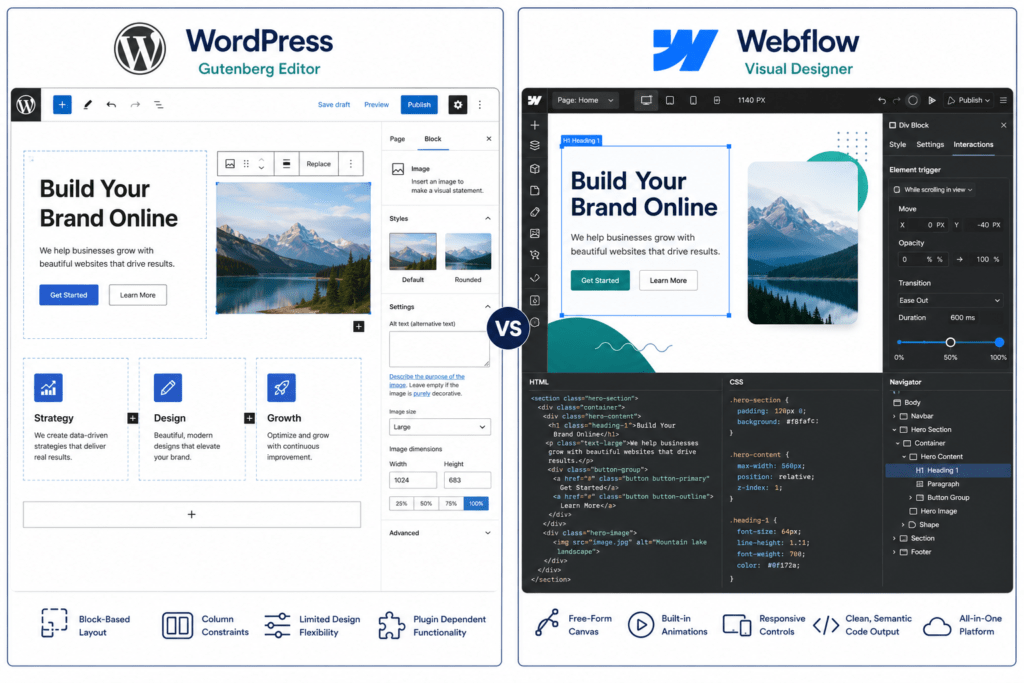
WordPress design is theme-dependent. You select a theme — either from the official repository, a marketplace like ThemeForest, or a custom build — and the theme determines your design boundaries. Within those boundaries, page builders like Elementor, Beaver Builder, or the native Gutenberg editor provide visual editing capability.
The result ranges from impressive to limiting depending on the theme quality, the page builder chosen, and how much custom CSS has been layered on top. WordPress can produce beautiful, highly customised sites — but achieving truly distinctive design typically requires a developer working around the constraints of the theme and page builder combination.
The Gutenberg block editor, WordPress’s native editing experience, has improved significantly in recent years but still produces less design flexibility than Webflow’s visual canvas for complex layouts. The challenge is that design quality in WordPress is heavily dependent on the skill of the implementer — two sites built on the same WordPress stack can look completely different in quality because the outcomes depend on knowing exactly which plugins, themes, and custom code to combine.
Webflow Design
Webflow’s visual designer is where the platform genuinely excels. You design from a blank canvas with control over every element — layout logic, interactions, animations, responsive behaviour — and the designer translates directly into clean HTML and CSS. What you see in the designer is what renders in the browser, without a translation layer that introduces inconsistencies.
This visual precision is why brands like Upwork, Zendesk, and Lattice choose Webflow for their marketing sites. When pixel-perfect execution, smooth interactions, and design consistency across breakpoints are non-negotiable requirements, Webflow’s designer removes the gap between what’s designed and what’s built.
For design teams and marketing teams who want to own their website’s visual expression without submitting tickets to a developer for every layout change, Webflow’s model is a genuinely different working experience. Design changes that would take a week of back-and-forth with a developer on WordPress can be executed and published in an afternoon.
The trade-off is the learning curve. Webflow’s designer is not a drag-and-drop builder in the consumer sense — it requires understanding CSS concepts like flexbox, grid, and position properties to use effectively. The ceiling for what you can build is very high. The floor requires more learning than a basic WordPress page builder.
Winner: Webflow for design quality, precision, and the ability to execute complex visual design without developer dependency. WordPress for the lower entry bar to basic design implementation.
Round 4: Ease of Use and Team Workflow
WordPress Ease of Use
WordPress has a genuinely low entry barrier for basic use. Most hosting providers handle the installation process automatically. The admin dashboard is familiar to anyone who’s used a CMS before. Creating and publishing posts, pages, and media is straightforward without technical knowledge.
The complexity scales rapidly with ambition. Installing plugins, configuring integrations, managing theme settings, and troubleshooting conflicts requires increasing technical confidence. For marketing teams without developer support, WordPress often creates a two-speed operation: content that lives in posts and pages can be managed independently, but anything involving the site’s structure, design, or technical configuration requires developer involvement.
Enterprise WordPress environments often require both front-end and back-end developer expertise — doubling the talent requirement for what should be a marketing platform. The operational cost of a marketing team that cannot publish without development tickets is one of the most consistently underestimated hidden costs in WordPress operations.
Webflow Ease of Use
Webflow has a steeper initial learning curve than WordPress for non-technical users. The visual designer requires understanding CSS concepts to use confidently, and the platform’s design philosophy means that getting the most out of it benefits from design education.
However, the distinction between who needs design-level access and who needs content-level access is well-defined. Webflow’s Editor mode lets content editors update text, images, and CMS collections — blog posts, team members, case studies — without ever touching the designer. In practice, this means marketing teams can publish independently once the site structure is established, without developer involvement for content-level changes.
The maintenance workflow is also significantly simpler. Because there are no plugins to update, no hosting infrastructure to manage, and no security patches to apply, the ongoing technical overhead drops dramatically compared to a comparably featured WordPress site. In Webflow, maintenance shifts from fixing issues to improving UX, performance, and business growth — which is where marketing teams should be spending their time.
Winner: WordPress for initial accessibility and the lowest entry bar. Webflow for marketing team independence and lower long-term operational overhead. For businesses without a developer on retainer, Webflow’s managed model often produces a better working experience despite the steeper initial curve.
Round 5: Security
This is one of the clearest-cut comparisons in the article, and it’s worth being direct about it.
WordPress Security
WordPress can be highly secure. The core software has a dedicated security team and patches known vulnerabilities promptly. With a quality security plugin (Wordfence, Sucuri), a reputable managed hosting provider, and a disciplined update routine, a WordPress site can be robustly protected.
The problem is that this level of security requires active, ongoing management. The majority of WordPress breaches occur through outdated or vulnerable plugins. A plugin with a security flaw that hasn’t been patched — or a site where plugins haven’t been updated because the owner didn’t know they needed to — is an open door. The attack surface is proportional to the number of plugins installed, which for a typical business WordPress site can be anywhere from 20 to 60 active plugins.
Without dedicated technical resource, WordPress security is a risk management problem that requires permanent attention. Hosting-level security, plugin audits, update monitoring, and backup verification are all responsibilities that sit with the site owner or their developer.
Webflow Security
Webflow’s security is handled centrally by the platform. SSL, DDoS protection, automatic updates, security patches, and backups are all included and managed without configuration. There is no plugin attack surface because there are no third-party plugins running on the server. There is no hosting configuration to get wrong because there is no separate hosting decision.
For businesses without dedicated IT or developer resource, this is a materially lower risk profile. The security question for a Webflow site is essentially resolved at the platform level — which means the team’s attention can go elsewhere.
Winner: Webflow — by a significant margin for businesses without dedicated technical resource. WordPress can match it with expert management, but that management is the responsibility of the site owner.
Round 6: Pricing and Total Cost of Ownership
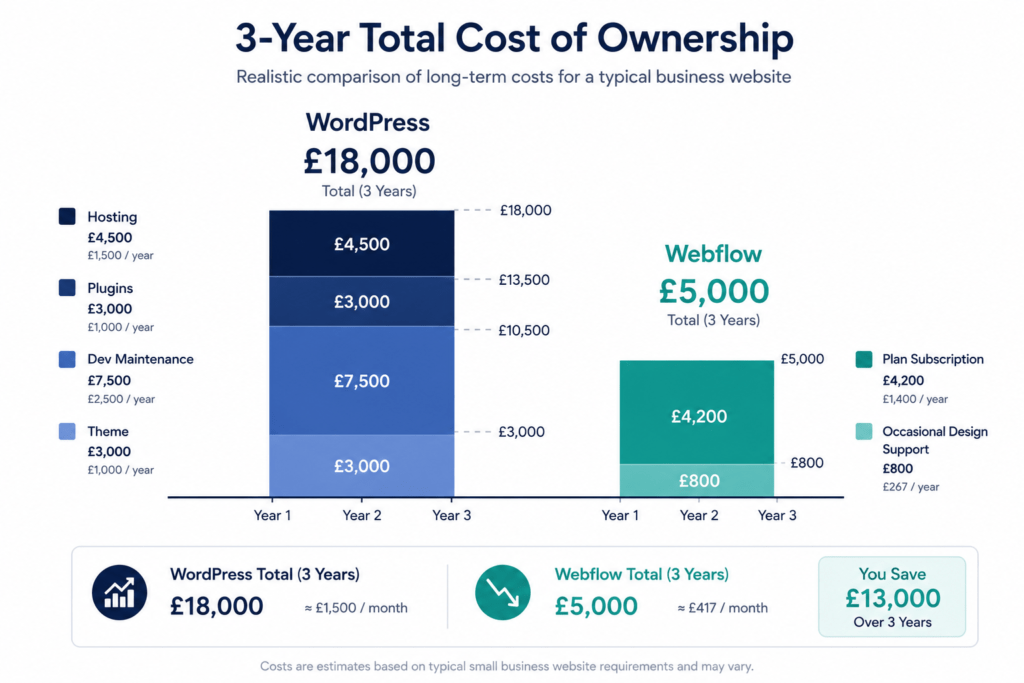
This is where the WordPress vs Webflow conversation most frequently misleads people. WordPress appears dramatically cheaper on the surface. The three-year total cost of ownership tells a different story.
WordPress: What It Actually Costs
WordPress software is free. That is not the same as free to operate.
A professionally run WordPress business site in 2026 typically incurs:
- Managed hosting: £20–£100/month (WP Engine, Kinsta, Cloudways). Shared hosting is cheaper but produces the performance and security profile that managed hosting exists to solve.
- Premium plugins: The plugins that make WordPress competitive — Yoast Premium or Rank Math Pro (SEO), WP Rocket (performance), Gravity Forms or WPForms (forms), a security plugin, a backup plugin, an email marketing integration, a page builder premium licence — typically cost £500–£2,000 per year in aggregate.
- Premium theme licence: £50–£300 one-time or annual
- Developer maintenance: Regular updates, troubleshooting, and the development work your marketing team can’t do without developer support. Even modest monthly developer retainers run £300–£800/month for a small business.
- The invisible cost: The time your marketing team spends waiting for developer availability, submitting tickets for changes that should take ten minutes, and working around a CMS that requires technical knowledge to operate confidently.
The direct costs alone — managed hosting, essential plugins, theme — typically run £1,500–£4,500 per year for a professionally maintained small business site. Add even modest developer support and the annual cost of a “free” WordPress site reaches £5,000–£15,000 for a business that depends on it commercially.
Webflow: What It Actually Costs
Webflow plans range from $14 to $39 per month (approximately £11–£31) billed annually, with hosting, SSL, CDN, and security included in every plan. There are no separate infrastructure costs, no mandatory plugin licences for SEO or security, and no hosting subscription to maintain separately.
For most small to mid-size businesses, the relevant plan is the Business plan at $39/month, which includes unlimited CMS items, 10,000 monthly form submissions, and white-label publishing. Total annual cost: approximately £370.
A Webflow site still benefits from professional design and build work — that’s a one-time agency or freelancer cost comparable to WordPress development. Ongoing Webflow costs are primarily the plan subscription and any specialist support for design-level changes. The day-to-day operational overhead for a marketing team is significantly lower because content editing, CMS management, and basic publishing don’t require developer involvement.
Webflow has higher upfront plan costs but typically a lower total cost of ownership for business websites. The predictable cost structure makes budgeting easier for small to medium businesses and marketing agencies.
Winner: Webflow on total cost of ownership for most business websites. WordPress on initial outlay and flexibility for large-scale or budget-constrained builds.
Round 7: Scalability and E-Commerce
WordPress Scalability
WordPress is one of the most scalable platforms available for content operations. Sites serving millions of monthly visitors run on WordPress — with the right hosting architecture, caching infrastructure, and technical configuration. The New York Times ran on WordPress for years. Large media companies, news organisations, and content-led SaaS businesses at enterprise scale operate on WordPress successfully.
For e-commerce, WooCommerce powers approximately 23% of all e-commerce websites worldwide. It supports large product catalogues, complex inventory management, extensive payment gateway integrations, and deep customisation through plugins. For businesses with thousands of SKUs, complex shipping rules, subscription products, or tight integration requirements with existing ERP systems, WooCommerce on WordPress remains the most capable and cost-effective e-commerce solution available without moving to a dedicated platform like Shopify or Magento.
Webflow Scalability
Webflow scales well for marketing sites and mid-size content operations — the CMS handles large content collections effectively, and the CDN infrastructure serves high-traffic sites reliably. For content-led marketing sites, SaaS marketing pages, professional service sites, and brand-led business websites, Webflow’s scale is more than adequate.
E-commerce is Webflow’s relative weakness. Webflow’s native e-commerce functionality suits smaller stores focused on design-led experiences, but it has meaningful limitations for larger operations. Crucially, Webflow sunset its native user accounts feature in January 2026 — membership sites now require third-party tools like Memberstack, which adds cost and complexity. Webflow does not have user account functionality, which means companies must buy costly add-ons to build a membership business via third-party apps.
For high-SKU e-commerce, complex fulfilment, or businesses where the transactional infrastructure needs to scale aggressively, WordPress/WooCommerce or a dedicated e-commerce platform is the stronger choice.
Winner: WordPress for large-scale content operations and complex e-commerce. Webflow for marketing-led sites, service business sites, and small to mid-size stores where design quality and operational simplicity matter more than e-commerce depth.
Round 8: Developer and Agency Experience
Building on WordPress
WordPress is the most documented platform in web development history. The developer talent pool is vast — finding WordPress developers is not a challenge. The ecosystem is so established that solutions to almost any problem have been publicly documented, discussed, and solved. For agencies managing large client portfolios, the workflow familiarity, the availability of talent, and the depth of the plugin ecosystem make WordPress a reliable delivery platform at scale.
The challenge is that WordPress development quality varies enormously. The open-source model means there is no baseline standard for how a WordPress site is built — two sites can look identical to the client while having fundamentally different code quality, performance profiles, and maintenance requirements underneath. Choosing the right developer matters significantly more than on Webflow, where the platform’s constraints produce more consistent output.
Building on Webflow
Webflow development requires platform-specific expertise. The visual designer has a learning curve, and the best Webflow builds come from developers and designers who understand both CSS deeply and Webflow’s specific design model. The Webflow developer community is smaller but more specialised — and the platform’s managed environment means that the work done in the designer is the work that runs in production, with less room for the quality variation that characterises the broader WordPress ecosystem.
For agencies and freelancers who specialise in Webflow, the workflow advantages are significant: faster design-to-production timelines, no separate hosting configuration, no plugin management, and the ability to hand sites over to clients who can manage content without developer involvement. The market for Webflow developers is growing rapidly, with experts predicting a CAGR of 23% from 2021 to 2031.
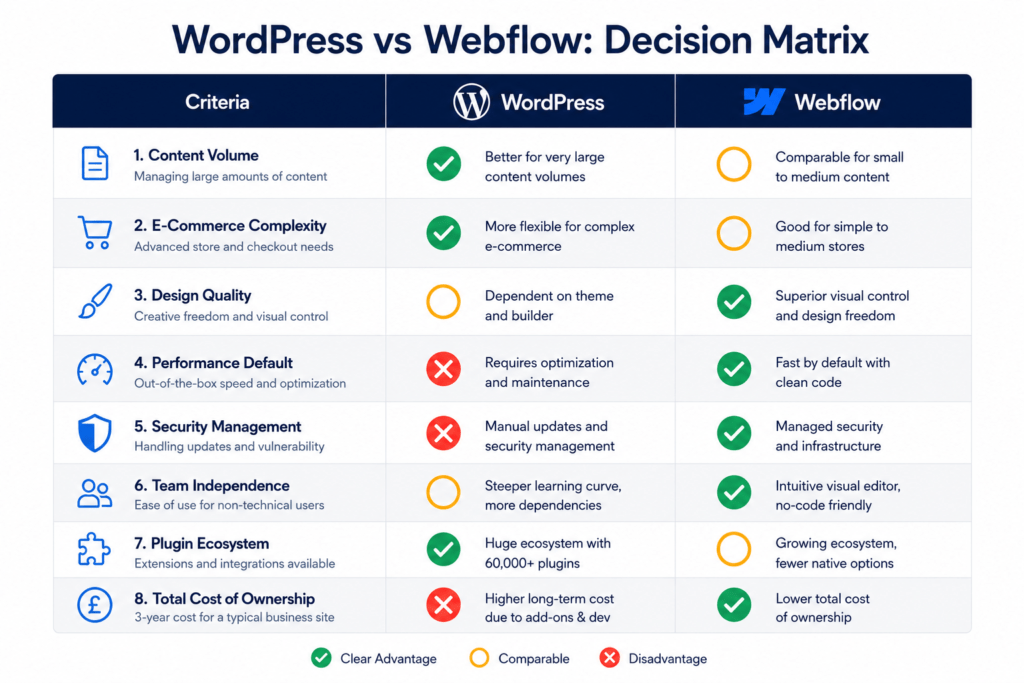
The Decision Matrix: Which Platform Is Right for Your Business?
Rather than a single recommendation, here’s how to think about the decision based on what actually matters for your specific situation.
Choose WordPress if your situation looks like this:
Content volume is high. If you’re publishing more than 10–15 pieces of content per week, managing a large archive, or running a content-led operation where editorial workflow tools matter, WordPress’s publishing infrastructure is superior.
E-commerce is complex. Large product catalogues, membership sites, subscription products, or deep integration requirements with existing retail infrastructure point strongly to WooCommerce.
You have dedicated developer resource. If you have a developer on your team or a reliable agency on retainer who manages WordPress maintenance actively, the platform’s limitations become manageable and its flexibility becomes a genuine asset.
Budget is severely constrained. The initial cost of setting up WordPress is lower than Webflow, and for a technically capable team willing to manage it, the ongoing operating costs can be controlled more tightly.
You need a specific plugin. WordPress has 60,000+ plugins. If your business has a specific integration, compliance requirement, or functionality need that can only be addressed through the plugin ecosystem, WordPress is the right choice.
Choose Webflow if your situation looks like this:
Design quality is a strategic priority. If your website needs to express a distinctive brand, execute complex interactions, or simply look better than your competitors, Webflow’s design capabilities produce results that WordPress with a page builder rarely matches.
Your marketing team needs to work independently. If the model of submitting developer tickets to publish a blog post or update a CTA is costing your team time and momentum, Webflow’s Editor mode resolves this.
You want performance without a performance engineer. If Core Web Vitals matter to you (and they should) and you don’t have a developer whose job includes maintaining WordPress performance, Webflow delivers fast, stable performance without that overhead.
Maintenance simplicity matters. No plugins to update, no security patches to apply, no hosting configuration to manage. For businesses where the website is a commercial tool, not an IT project, this is a genuine operational advantage.
You’re building a lead generation or marketing site. SaaS marketing pages, professional service sites, agency sites, consultant sites, product launch pages — all of these benefit from Webflow’s design freedom and performance-by-default more than they benefit from WordPress’s content scaling capability.
Real Business Scenarios: What the Decision Looks Like in Practice
The Agency That Moved Its Own Site from WordPress to Webflow
A 12-person digital marketing agency had run their own website on WordPress for six years. By 2024, they had 43 active plugins, a monthly developer invoice that averaged £400 for maintenance alone, and a marketing team that described updating the site as “like pulling teeth.”
The move to Webflow took eight weeks — the agency built and designed the new site themselves. Post-migration: plugin count dropped to zero, the monthly maintenance bill disappeared, the marketing team now publishes content without developer involvement, and the site’s Core Web Vitals moved from “needs improvement” to “good” across all metrics.
Their experience is typical of marketing-led service businesses that make the transition: the investment in migration pays back within the first year through reduced maintenance costs and improved team velocity.
The Media Company That Stayed on WordPress
A regional news and lifestyle publisher considered Webflow when rebuilding their site in 2025. After a detailed evaluation, they stayed on WordPress — and it was the right decision.
Their operation publishes 40 pieces of content daily across 12 editorial contributors. Their archive contains 80,000+ articles dating back to 2009. They have custom editorial workflow plugins, a subscriber paywall built on WordPress’s user account system, and deep integration with their CRM and advertising platform.
Webflow’s CMS, while capable, is built for a different content model. The editorial workflow tools, the archive management, the user account infrastructure, and the plugin integrations their operation depends on have no native Webflow equivalent. WordPress was and remains the right choice for a content operation at this scale and complexity.
The SaaS Company That Used Both
An interesting pattern we’ve seen repeatedly in SaaS companies: using Webflow for the marketing site and WordPress for the blog — leveraging each platform’s strengths in the context where they apply.
The Webflow marketing site delivers design quality, fast performance, and marketing team independence on the landing pages, product pages, and campaign pages that drive conversions. The WordPress blog — embedded as a subdomain or integrated via headless architecture — handles the high-volume content publishing where WordPress’s editorial workflow is genuinely superior.
This isn’t always the cleanest technical architecture, but for companies where marketing conversion and content volume are both genuine priorities, it’s a pragmatic solution that acknowledges what each platform is actually good at.
Expert Observations: What We’ve Seen Across Dozens of Client Builds
A few consistent patterns from agency experience on both platforms that don’t always appear in product comparisons:
The hidden cost of WordPress is team velocity, not just maintenance. The money spent on developer maintenance is visible in invoices. The opportunity cost of a marketing team that waits three days for a developer to change a headline on the homepage is invisible in the accounts but very real in competitive impact. This is one of the most consistently underestimated arguments for Webflow in the small-to-mid business segment.
Webflow sites look better on average — not because Webflow makes designers better, but because it removes the constraints that make bad design inevitable. WordPress’s theme and plugin architecture introduces constraints that make distinctive design harder to achieve. Webflow’s blank canvas removes those constraints. Average output quality rises when the tools get out of the designer’s way.
WordPress technical debt is real and it compounds. A WordPress site that was well-built in 2020 has usually accumulated significant technical debt by 2026 — deprecated plugins, outdated theme code, accumulated custom CSS, and hosting configurations that made sense then but are no longer optimal. The cost of that debt shows up in performance scores, security risk, and the difficulty of making changes cleanly. This is one of the strongest arguments for considering Webflow during a redesign: the migration is also a debt reset.
Neither platform has a native GEO advantage — the content decisions matter more. For AI search visibility, the platform matters less than the content strategy. Both WordPress and Webflow can produce well-structured, schema-marked, direct-answer content that AI tools cite. The structural advantage Webflow has is cleaner code and faster performance — which are indirect GEO signals, not direct ones.
Future Outlook: Where Both Platforms Are Heading
WordPress is investing significantly in AI-assisted content creation, the Gutenberg block editor, and performance improvements. The core project remains the most developed CMS ecosystem in the world, and the open-source community that surrounds it will continue to produce innovations that no single company could replicate. The challenge is whether the plugin-dependent architecture can adapt to a world where performance, security, and AI-readiness are baseline expectations rather than premium add-ons.
Webflow is investing in AI design tools, expanded CMS capabilities, and enterprise governance features. The deprecation of native user accounts in January 2026 was a signal that Webflow is refining its focus — leaning into its strength as a marketing and design platform rather than trying to compete with WordPress’s user management and e-commerce depth. The market for Webflow developers is growing at 23% CAGR, and the platform’s positioning as a design-quality, low-maintenance alternative to WordPress is resonating with a specific and growing segment of the market.
Both platforms will be important in 2030. The choice between them in 2026 is not about which will survive — it’s about which fits your operation now and for the next three to five years.
Conclusion: Stop Looking for the Better Platform. Find the Right One.
The WordPress vs Webflow debate is framed as a contest, but it’s really a matching exercise. The platform that’s right for you is the one whose architecture, workflow, and cost model aligns with how your team actually operates — not the one that wins the most feature comparisons in a vacuum.
WordPress powers 43.6% of the internet for good reason. Its flexibility, its ecosystem depth, and its ability to handle content and e-commerce at any scale make it the right answer for a significant proportion of web projects. For complex e-commerce, large content operations, highly customised applications, or budget-constrained projects where technical resource is available, WordPress remains the benchmark.
Webflow has grown rapidly for equally good reason. For marketing-led businesses, service companies, agencies, and brands where design quality, team independence, performance, and maintenance simplicity are the priorities, Webflow consistently delivers a better operational outcome — and a better return on the website investment over time.
The honest answer to “which is better?” is: it depends on which one fits your business. Use the criteria in this guide to make that assessment clearly — not based on which platform has more advocates on Twitter or which one your last agency happened to build on.
Build on the platform that serves your business. Not the one that wins the debate.
Trying to decide between WordPress and Webflow for your next build or redesign? The most useful thing you can do is audit your current operation against the criteria above: your team’s technical capacity, your content volume, your e-commerce requirements, and what you’re actually optimising for. If you want a second opinion from people who’ve built seriously on both, that’s a conversation worth having before you commit.
Frequently Asked Questions
Q: Is WordPress or Webflow better for SEO in 2026? Both platforms are capable of excellent SEO outcomes. Webflow wins on technical SEO by default — clean semantic HTML, fast performance via its global CDN, and native meta tag management without plugins. WordPress wins on advanced SEO tooling through Yoast or Rank Math, which offer more granular schema configuration and content scoring. For most small to mid-size businesses, Webflow’s performance advantage produces better real-world results. For large content operations with dedicated SEO teams, WordPress’s plugin ecosystem offers more configurability.
Q: Is Webflow more expensive than WordPress? WordPress software is free but operating it professionally is not. A properly run WordPress business site typically costs £1,500–£4,500 per year in hosting, plugins, and theme licences — before any developer support. Webflow’s Business plan costs approximately £370 per year with hosting, SSL, CDN, and security included. Total cost of ownership over three years typically favours Webflow for most small to mid-size businesses, despite WordPress’s lower headline cost.
Q: Which is better for a small service business — WordPress or Webflow? For most small service businesses — consultants, agencies, professional services firms, local service providers — Webflow is the stronger choice in 2026. Design quality, low maintenance overhead, fast performance without technical configuration, and marketing team independence are priorities that Webflow’s managed platform addresses more naturally than WordPress.
Q: Can non-technical users update a Webflow website? Yes. Webflow’s Editor mode allows content editors to update text, images, blog posts, team profiles, and CMS-managed content without accessing the designer. Complex layout changes require designer access, but day-to-day content management is accessible to non-technical team members. This independence is one of Webflow’s most significant operational advantages for marketing teams.
Q: Which platform is more secure? Webflow is more secure by default — SSL, DDoS protection, automatic updates, and backups are managed by the platform without configuration. WordPress can be equally secure but requires active management: plugin updates, security plugin configuration, and hosting-level protections. Most WordPress breaches occur through outdated or vulnerable plugins. For businesses without dedicated IT resource, Webflow’s managed security model significantly reduces risk.
Q: Can you migrate from WordPress to Webflow without losing SEO? Yes, if the migration is handled correctly. The key requirements are: comprehensive 301 redirect mapping for every URL that changes, metadata transfer or rewrite for all pages, and post-migration crawl verification before DNS transfer. A well-executed migration should maintain rankings and — given Webflow’s performance improvements — often produces ranking gains. One documented case saw organic traffic triple within the first month post-migration. A poorly executed migration without redirects can lose rankings that took years to build.
Q: Is WordPress still relevant in 2026? Absolutely. WordPress powers 43.6% of all websites on the internet with a 61.3% CMS market share as of March 2026. For content-heavy sites, complex e-commerce, and projects requiring deep customisation, it remains the most capable platform available. The market share of Webflow at 1.2% — while growing rapidly — reflects that WordPress’s dominance is far from under threat across the broad web. What’s changing is the specific segment of businesses where Webflow has become the more sensible choice.
Q: Does Webflow work for e-commerce? Webflow has native e-commerce for smaller stores prioritising design quality — supporting physical and digital products, automated taxes, and customisable checkout. For large-scale e-commerce with extensive product catalogues, complex inventory management, or membership functionality (note: Webflow sunset native user accounts in January 2026), WooCommerce on WordPress or a dedicated platform like Shopify is the stronger choice.