That story is more common than it should be. Thousands of businesses have a Google Business Profile — because someone set it up years ago to claim the listing — and approximately none of it has been touched since. No posts. No photo updates. Unresponded reviews. A description written before the business changed direction. An outdated phone number. Hours that don’t reflect a seasonal change made eighteen months ago.
And then they wonder why they rank third, or fifth, or don’t appear at all.
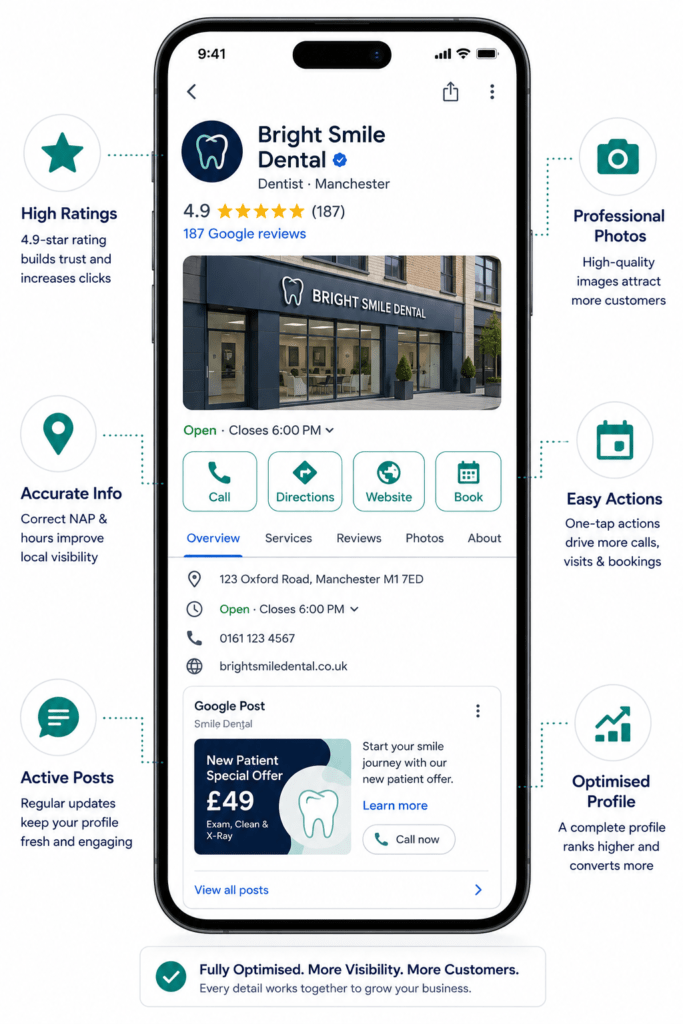
In 2026, Google Business Profile is not a form you fill in once. It is a dynamic, actively managed performance channel — the single most important local SEO asset available to most businesses, with a direct line to both traditional local search rankings and the AI-generated results that are now consuming an increasing share of local search real estate.
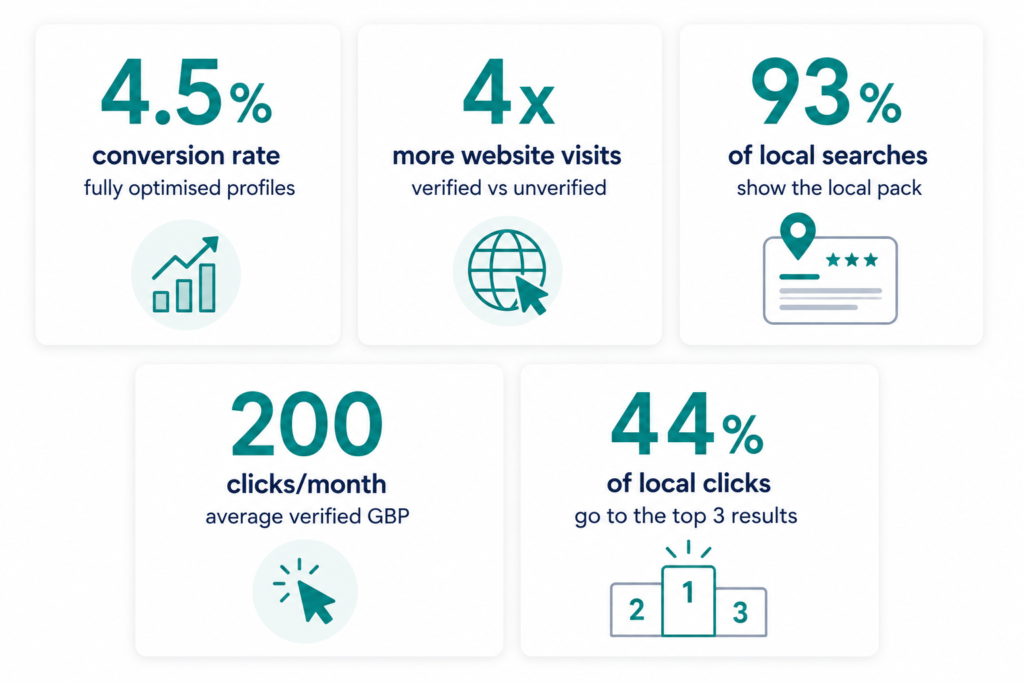
A verified Google Business Profile gets around 200 clicks or interactions per month. 40.16% of local business queries trigger Google’s AI Overviews. 88% of consumers who conduct a local search on their smartphone visit or call a store within a day.
Google Business Profiles appear in approximately 87% of local-intent searches with map-based results, and the local 3-pack captures about 44% of all Google local clicks.
The opportunity is enormous. The gap between a neglected profile and an optimised one is wide enough to determine whether your business appears at all for the searches your best customers are making right now.
This guide covers everything — from the foundations of setup and verification to the advanced optimisation strategies that separate businesses ranking consistently at the top of the local pack from those buried underneath them.
Why Google Business Profile Matters More in 2026 Than It Ever Has
The commercial case for GBP optimisation has strengthened every year — and 2026 represents the sharpest inflection point yet, because Google’s AI systems have become deeply integrated with GBP data.
Fully optimised GBP profiles convert at a rate of 4.5%, compared to 1.8% for incomplete listings. Profiles with complete information — hours, services, links — convert 3.2 times more often.
Verified profiles generate up to 4x more website visits and double-digit increases in calls and direction requests. The performance gap is clear: unverified profiles increasingly lose visibility and miss high-intent customer actions.
The local pack appears for 93% of local searches and takes up an average of 33% of visible screen space on mobile.
The AI dimension is where things have changed most significantly in 2026. Google is now using machine learning to automatically populate service lists on business profiles, even without the business owner adding them manually. This means that if you’re not actively managing your profile, Google’s AI may be describing your business in ways that are inaccurate, incomplete, or actively misleading to prospective customers.
According to recent data, AI now uses signals like profile freshness, review sentiment, and content recency to decide which businesses to surface. The “Decay Rate” of visibility is faster than ever — businesses that hadn’t posted an update or photo in over 30 days reported dramatic drops in GBP impressions following a recent algorithm update.
That’s a fundamental shift from the static listing model most businesses still operate under. Your GBP needs the same active management discipline as your social media presence — with the additional motivation that local search intent converts dramatically higher than any social traffic.
Step 1: Claim, Verify, and Secure Your Profile
Everything starts here. A profile that isn’t verified will not reach its ranking potential, will not access all features, and is vulnerable to being claimed or edited by third parties.
Claiming Your Profile
Visit business.google.com and sign in with the Google account you want to associate with your business. Search for your business name. If it already appears — which it often does, as Google creates profiles from public data — claim it. If it doesn’t, create it from scratch.
Use a Google account that your business controls permanently. Do not use a personal Gmail that an employee might take with them when they leave. Create a dedicated Google account for business profile management, or use Google Workspace.
Verification in 2026
Video verification is now the default for new listings in most regions. Record a single continuous take that shows your signage, interior, and a live management action to pass first-time.
The video verification process requires you to show your business premises signage, your interior, and proof that you’re the business owner — such as logging into the Google Business Profile dashboard on a device at the premises. Record it in one continuous, unedited take. Google’s systems detect edited video and will reject it.
76% of businesses are now verified in 2026, up from 71% in 2024. Unverified profiles increasingly lose visibility and miss high-intent customer actions.
Protecting Your Profile
Once verified, add additional managers through the profile dashboard rather than sharing your primary login credentials. Set up GBP notifications so you’re alerted to any suggested edits from users — Google allows the public to suggest changes to your profile, and these can be applied automatically if not reviewed. Check your profile monthly for unauthorised changes.
Step 2: Complete Every Field With Precision
Nearly 62% of top-ranking local profiles have fully completed setup fields. Profiles with complete information generate roughly 2.3x more search visibility than incomplete listings.
Profile completeness is not a one-time task — it’s a foundation that needs maintaining as your business evolves.
Business Name
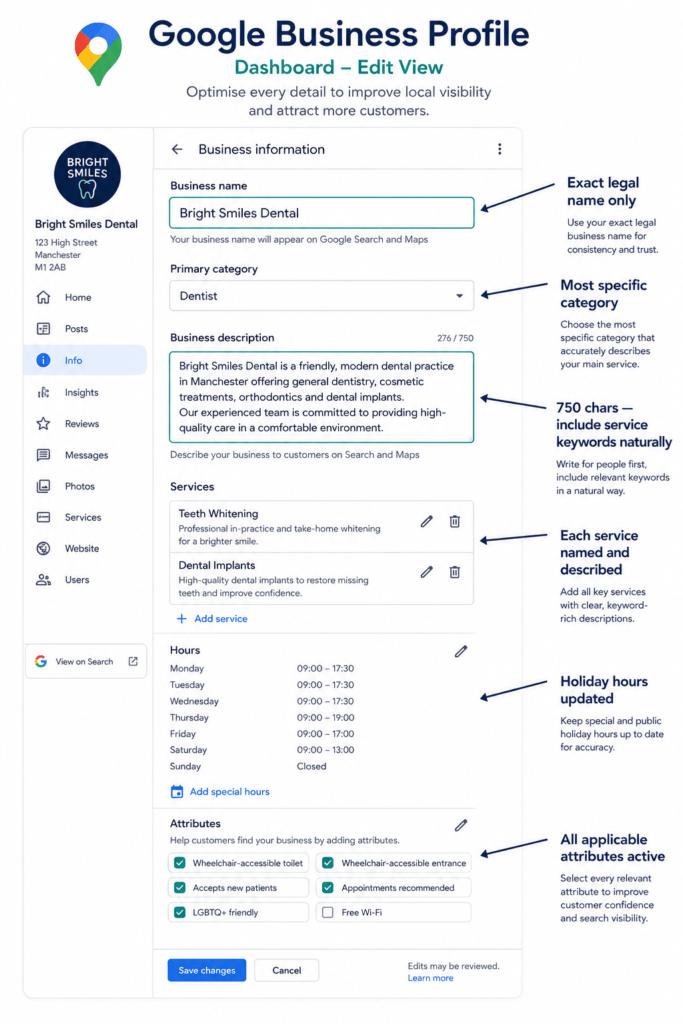
Your business name should be exactly what appears on your storefront and legal documents. Google is cracking down hard on keyword-stuffed business names — profiles have been suspended or penalised for adding keywords artificially. Use your actual business name only.
Category Selection — The Single Biggest Ranking Lever
Primary category is the single biggest ranking lever on your profile. Switching a law firm from “Law Firm” to “Personal Injury Attorney” can change Maps visibility more than any other single edit. Choose the narrowest, most accurate category available.
Your primary category must precisely describe your core service. Google maps categories to specific search queries — a business in the wrong category will not appear for the searches its customers are making, regardless of how well everything else is optimised.
Add secondary categories for each additional service you genuinely offer. Businesses using primary and secondary categories correctly see roughly 17% stronger local visibility.
Business Description
Your description is 750 characters — use them strategically. Write in plain language that directly describes what you do, who you serve, and what makes your approach distinctive. Include primary service terms and location naturally, but do not keyword-stuff.
The description serves two purposes: it helps Google understand what searches your business is relevant for, and it’s increasingly used as source material by Google’s AI systems for AI-powered descriptions and AI Overview mentions. Keep it consistent with your website’s homepage and your LocalBusiness schema — entity consistency across these signals reinforces Google’s confidence in your profile.
Services and Products
Fill in every service entry with a name, description, and optional price. Google is now automatically populating service lists using machine learning — log in regularly, review AI-generated content, and correct anything inaccurate. Do not assume Google got it right. Adding products or services boosts conversion rates by 28%.
Business Hours
Hours must be accurate including holiday hours, seasonal variations, and temporary closures. Set special hours for bank holidays proactively. Incorrect hours are one of the most common causes of one-star reviews.
Attributes
Attributes cover accessibility features, payment methods, Wi-Fi, outdoor seating, parking, and more. Spend 15 minutes reviewing every available attribute and activating all that genuinely apply. These appear as filter options in Google Maps — a user filtering by “wheelchair accessible” sees only businesses with that attribute active.
Step 3: Photos — The Most Visible Trust Signal on Your Profile
Profiles with professional photos receive 35% more clicks than those with amateur or stock images. GBP listings with 20+ photos earn about 18% more clicks than profiles with fewer than five. Profiles with regular visual updates maintain roughly 22% more discovery engagement over time.
The Complete Photo Library
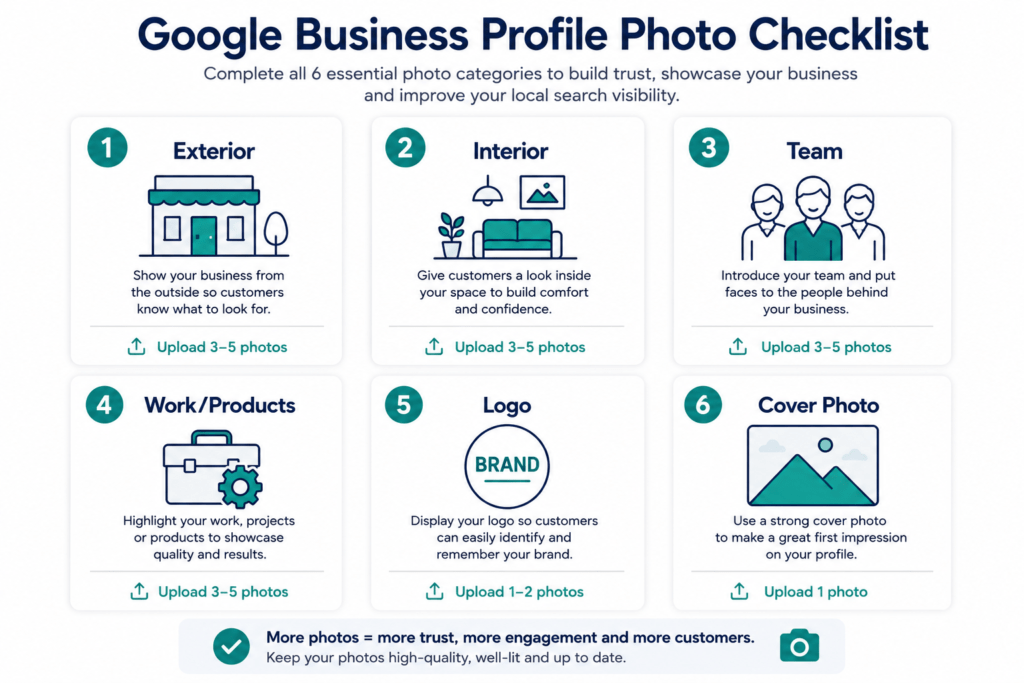
Upload photos across these categories:
Exterior photos: Your premises from the street, at least two angles, both during the day and at dusk. This helps customers identify your location and signals to Google that your physical address is real and current.
Interior photos: The customer-facing space — reception, meeting rooms, dining room, sales floor, or working environment depending on your business type.
Team photos: Real photography of your actual team. Customers who see your team before visiting feel a connection that drives follow-through. Never use stock photography of models.
Work or product photos: Completed projects, products in use, before-and-after comparisons. These carry significant conversion weight for service businesses.
Logo and cover photo: Your logo should be clean and high-resolution. Your cover photo appears prominently at the top of your profile — use a high-quality image that represents the business at its best.
Photo Quality and Refresh Cadence
Upload at 720p resolution minimum; 1200×900 or above is preferred for interior and exterior shots. Businesses that upload new photos monthly see roughly 24% higher profile interaction rates. Build a routine of uploading two to four new photos per month.
Google Lens and Visual Search
Google significantly expanded its reliance on visual search through Google Lens — your photos are now discoverable beyond traditional text search. A customer who photographs your building, product, or signage may be matched to your GBP through visual search. Photo quality and coverage is increasingly a discoverability signal, not just a conversion one.
Step 4: Reviews — The Ranking Signal Built One Conversation at a Time
Reviews are simultaneously the most powerful ranking signal, the highest-converting trust signal, and the most difficult element of GBP to shortcut.
One additional review can generate 600+ search impressions, 80+ website visits, 63+ direction requests, and 16+ calls. Conversion rates for businesses that reply to all reviews exceed 5.1%. Google Reviews directly influence your Local Pack ranking position and your AI Overview citation probability at the same time.
Review velocity beats review count. A steady flow of reviews over 90 days ranks better than a sudden burst of 50 followed by silence.
Building a Review Generation System
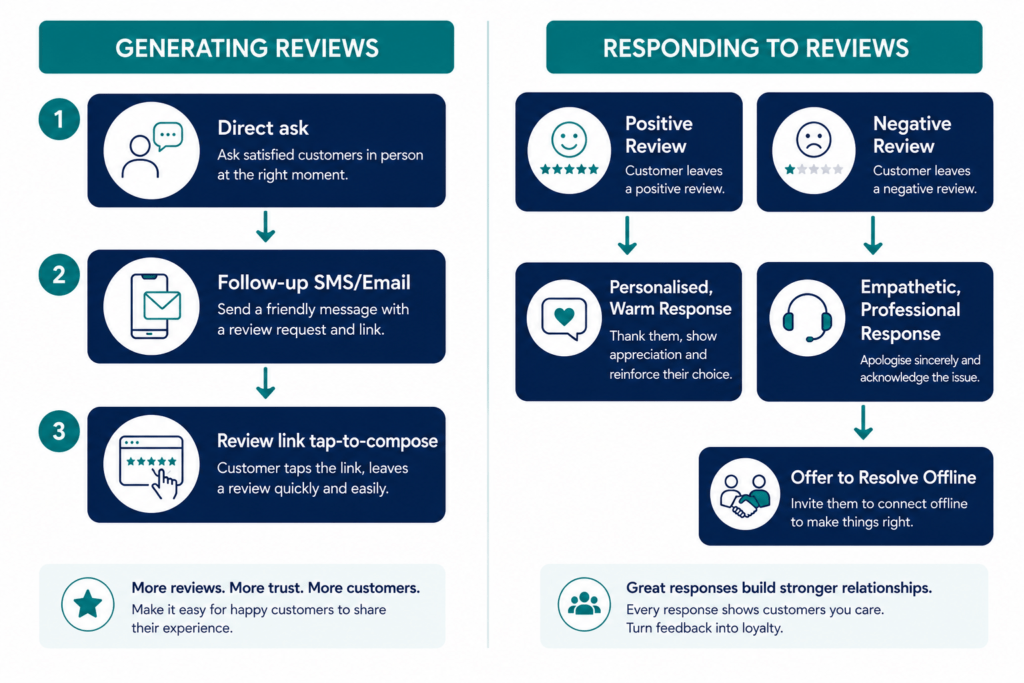
The direct ask at the moment of satisfaction. The highest-converting review request is a warm, specific, in-person ask when a customer expresses genuine satisfaction. Train your team to identify that moment: “We’d really appreciate a Google review — it makes a huge difference for a small business like ours.”
The follow-up trigger. Set up an automated SMS or email within one to two hours of a completed service, with a direct link to your Google review compose screen. Direct links convert significantly higher than links to your profile homepage.
Your review link. From your GBP dashboard, go to Ask for Reviews and copy the short URL. Use this in SMS follow-ups, email footers, QR codes on receipts, and anywhere you prompt reviews.
Responding to Reviews
Responding to every review is non-negotiable in 2026. Your response is visible to every future customer who reads it — it’s not communication with the reviewer, it’s communication with your future audience.
Positive reviews deserve a warm, specific, personalised response — not a copy-paste template. Negative reviews require a professional, non-defensive response that acknowledges the issue and offers offline resolution. Never argue with a reviewer publicly.
Google removed more than 170 million fake reviews in 2025, a 38% increase over the previous year. Do not attempt to acquire reviews through incentives or review-buying services — profile suspension risk is real and growing.
Reviews that organically mention specific services or locations provide keyword signals that Google actively weighs. Encourage customers to be specific in their reviews rather than generic.
Step 5: Google Posts — Weekly Content That Converts
Businesses that post weekly on GBP see 28% more website clicks and 42% more direction requests than those posting monthly. Posts with a CTA button generate 2.3x more clicks than those without. Posts with images receive 150%+ more views than text-only posts.
Posts are engagement signals, not direct ranking signals — they lift click-through in the local panel and act as conversion assets. The optimal post length is 150–300 words.
Post Types and When to Use Each
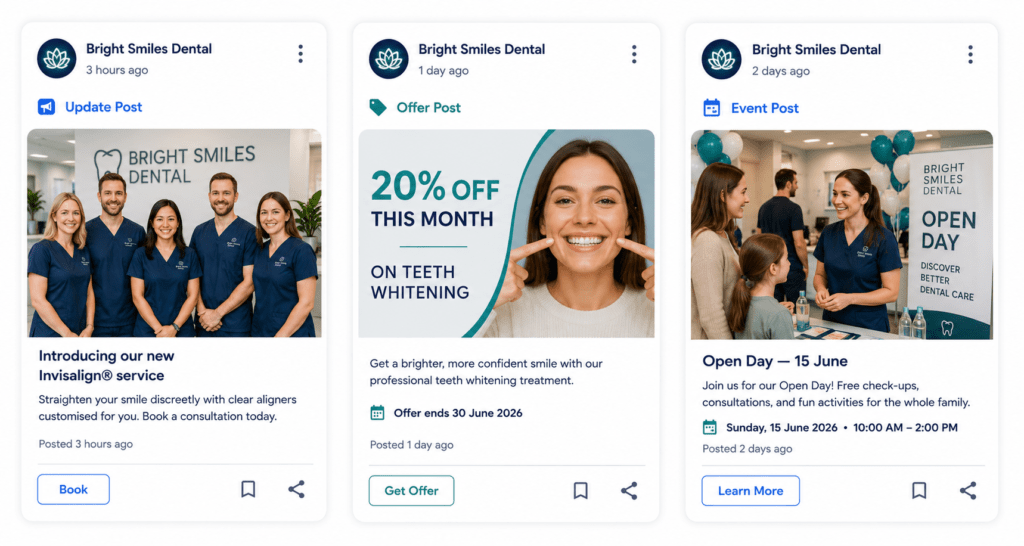
Updates: General business news, seasonal content, service announcements. Best for thought leadership and community content.
Offers: Promotions with start and end dates. Offer posts perform best with an average CTR of 2.18%. Use for genuinely time-limited promotions.
Events: Upcoming activities with start and end dates. Best for businesses that run workshops, open days, or seasonal events.
Products: Specific products or services with photos, prices, and descriptions. These feed into the Products section of your profile.
The Weekly Post Framework
A sustainable weekly rhythm:
- Week 1: Update post — useful advice, a case study, or a behind-the-scenes insight
- Week 2: Offer or Event post — a current promotion or upcoming service availability
- Week 3: Update post — a new piece of work, team news, or customer success story
- Week 4: Service spotlight — a detailed description of one specific service with a direct CTA
Every post should include a high-quality image, a CTA button, and 150–300 words. Adding localised content improves lead conversions by 17% — reference your town or area where naturally applicable.
Use the post scheduling feature to batch-create a month’s posts in one session rather than logging in weekly.
Step 6: Q&A — Control the Narrative Before Others Do
The Q&A section allows anyone to ask and answer questions about your business, visible publicly on your profile. Businesses that proactively fill in the Q&A section receive 18% more clicks than those that leave it empty. GBP profiles with FAQ content rank 23% more often in voice search results.
Most businesses leave their Q&A section entirely empty — creating a reputation risk and a missed conversion opportunity simultaneously.
Seeding Your Q&A Section
Post the questions your customers most commonly ask and answer them thoroughly yourself, as the business owner. Aim for 8–12 entries covering:
- What are your prices / do you offer free consultations?
- Do you cover [specific area or town]?
- What are your payment methods?
- Is parking available?
- Do you require appointments or do you accept walk-ins?
- What is your typical turnaround time?
- Are you accredited by [relevant professional body]?
- Is your premises accessible for wheelchair users?
- Do you offer emergency or same-day services?
- What should I bring to my first appointment?
Set up GBP notifications so you’re alerted whenever a new question is posted. Answer every new question within 24 hours.
Google is now generating AI-powered Q&A on some profiles. Review these regularly and correct any inaccurate AI-generated answers — they appear alongside your own responses and can mislead prospective customers.
Step 7: Messaging — The Fastest-Growing Conversion Channel
Messaging via GBP is growing 45% per year. Businesses that respond within 5 minutes convert 3x better than those responding later.
Enable messaging in your GBP dashboard. Set a welcome message that confirms receipt and sets expectations: “Thanks for getting in touch. We aim to respond within 2 business hours. For urgent enquiries, please call us on [number].”
The 5-minute response window is commercially critical. A prospect who messages at 2pm and receives a reply the next morning has almost certainly contacted a competitor in the interim. Assign messaging responsibility to a specific team member with push notifications enabled on their phone.
AI-powered messaging now enables instant, contextual responses for businesses with high message volumes. Configure automated responses for frequently asked questions using GBP’s built-in auto-reply options.
Step 8: Booking and Appointment Links
Businesses using booking integrations report 19% higher total conversions. Yet only about 31% of businesses have added appointment or booking links to their profile — the majority are missing a direct conversion mechanism on their most visible local asset.
Google integrates natively with Calendly, Booksy, Fresha, SimplyBook, Acuity, and many industry-specific systems. Add the booking link that corresponds to your scheduling system. A customer who has decided they want to book is one tap away from doing so — if the link is in place.
For businesses where direct booking isn’t appropriate, add a “Get Quote” or “Contact” button linking to your most specific enquiry page.
Step 9: The AI Overviews Dimension
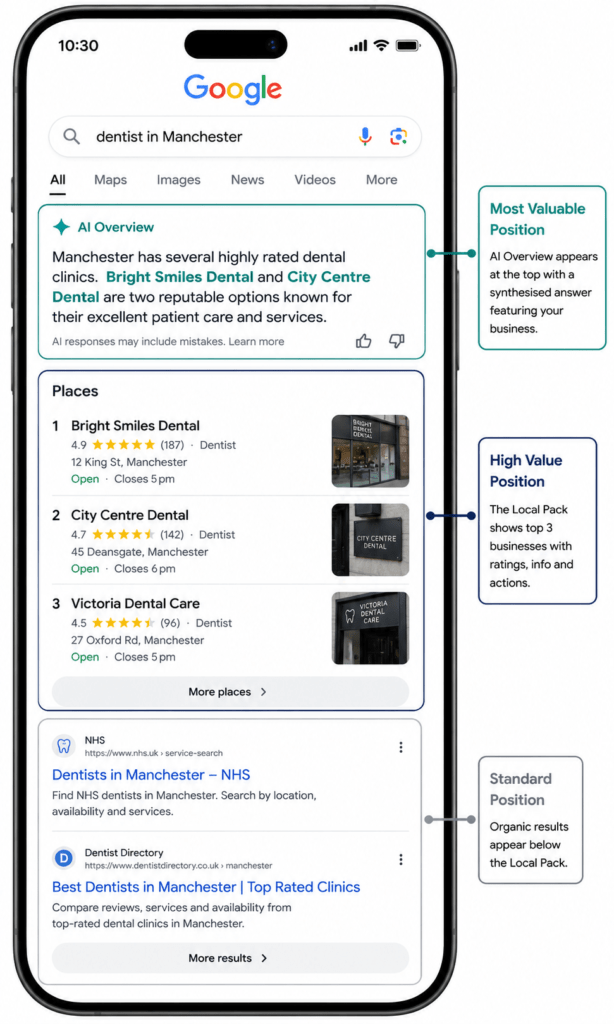
40.16% of local business queries now trigger Google’s AI Overviews. These appear above the local pack in many searches — making AI Overview placement one of the most valuable positions in local search, and one that requires deliberate optimisation to earn.
Google’s AI prioritises businesses that are clear, authoritative, and directly answer user questions. Your website content, your GBP, and your online reputation are all evaluated together.
In 2026, Google Reviews influence both your Local Pack position and your AI Overview citation probability simultaneously. A 4.7-star business with 180 recent reviews will appear in AI answers. A 3.0-star business with nothing recent will not.
What Drives AI Overview Inclusion
Consistent, accurate profile data. Every field completed, NAP consistent with your website and all citations, services described specifically.
Review volume, recency, and content. Reviews mentioning specific services, locations, and staff names provide keyword signals AI systems use to match your business to relevant queries.
Content freshness. Regular posts and photo updates signal an active, well-managed business.
Website alignment. Your website’s service and location content should reinforce your GBP profile, not contradict it.
Schema markup. LocalBusiness schema on your website provides machine-readable structured data that AI systems use for entity resolution — as documented in the schema section of this article.
Optimising for AI Overviews in local search is not a separate project — it’s the outcome of executing GBP and local SEO fundamentals with higher precision and greater consistency than your competitors.
Step 10: GBP Insights — Reading the Data That Matters
The revamped GBP Insights dashboard now offers advanced analytics including heatmaps and conversion tracking. Understanding your performance data is what separates managed GBP from a static listing.
Metrics Worth Tracking Monthly
Profile views: How many times your profile appeared in Search and Maps. Month-over-month trends indicate whether visibility is growing.
Search queries: The specific searches that surfaced your profile — invaluable for identifying ranking opportunities you haven’t consciously optimised for.
Customer actions: Website clicks, direction requests, phone calls, and message conversations. These are your conversion signals.
Review performance: Average star rating, review volume, and response rate over time. Track velocity — if new reviews are slowing, your generation system needs attention.
The Monthly Review Routine
Once per month, spend 20–30 minutes in GBP Insights:
- Profile views vs. previous month — growing, stable, or declining?
- Top search queries — any new terms worth leaning into?
- Customer action volumes — growing proportionately with views?
- Review velocity — maintained? Any sentiment shift?
- AI-generated services or description updates that need correction?
The Weekly Management Routine: 30 Minutes That Sustains Rankings
Listings updated monthly experience 32% better performance in both engagement and conversions. Weekly updates perform better still.
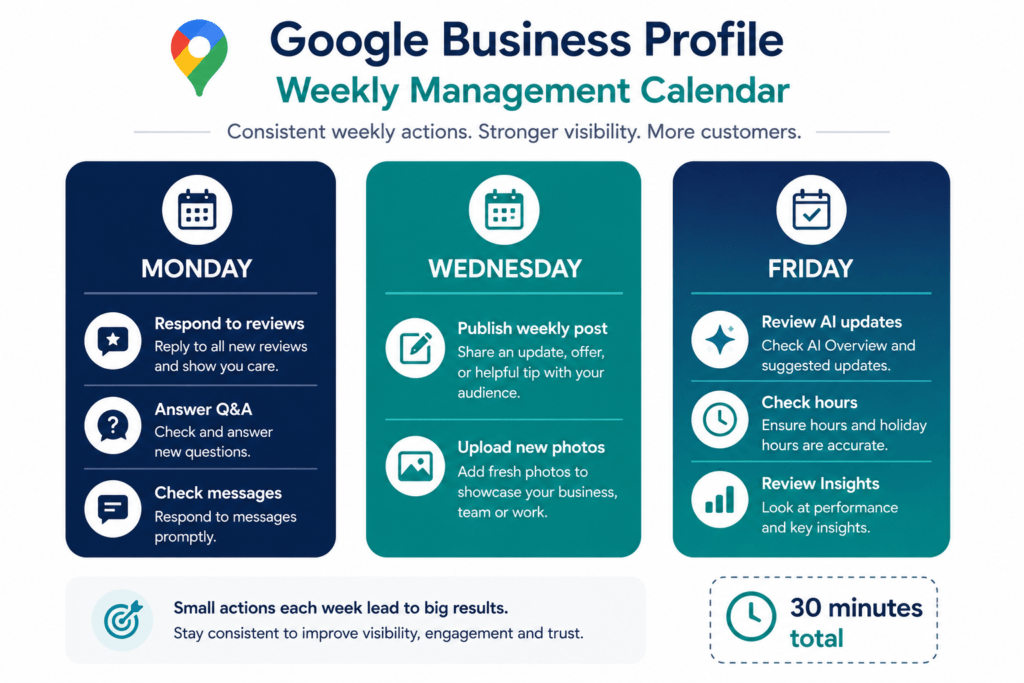
Monday (10 minutes):
- Review new reviews received over the weekend and draft responses to all
- Check Q&A for new questions and answer within 24 hours
- Check messages and respond to any unanswered conversations
Wednesday (10 minutes):
- Publish the week’s Google Post
- Upload one to two new photos if available
Friday (10 minutes):
- Review any AI-generated content updates — approve accurate ones, edit or reject inaccurate ones
- Confirm business hours are correct for the coming week
- Brief Insights check for unusual movements
That’s 30 minutes per week. Sustained over 12 months, this routine produces local pack ranking improvements that no one-off optimisation project can replicate.
Common Mistakes That Cost Local Rankings
Using the wrong primary category. The most impactful mistake. Audit your primary category quarterly — Google adds new, more specific categories regularly.
Keyword-stuffing the business name. Adding location or service keywords to a business name that doesn’t legally include them is a suspension risk. Google is cracking down hard on this in 2026.
Leaving AI-generated content unchecked. Google auto-populates service lists and descriptions using AI. Inaccurate AI-generated content that isn’t corrected misleads customers and sends wrong relevance signals. Check monthly.
Inconsistent NAP. Businesses with consistently accurate NAP data across all platforms rank 28% higher in the local pack. Different phone numbers, address formats, or trading names across directories introduce entity uncertainty.
Review bursts without velocity. Generating 40 reviews in a campaign then reverting to zero sends artificial signals that Google’s spam detection increasingly flags.
Not monitoring for profile edits. Google accepts public suggested edits. Without notifications enabled, your address, phone number, or hours may have been changed without your knowledge.
Treating GBP as set-and-forget. Businesses inactive for over 30 days reported dramatic drops in GBP impressions following a recent algorithm update. Activity is a ranking signal.
Real Business Examples: What Proper GBP Management Produces
A Dental Practice That Moved From Third to First in Six Weeks
A four-chair dental practice had been ranking third in the local pack for over a year. Their profile was verified, their category correct, and they had 47 reviews. But their last Google Post was eight months old, they’d never responded to a review, their Q&A was empty, and their last photo upload was 14 months prior.
After implementing weekly posts with CTA buttons, responding to all 47 existing reviews and requesting new ones from recent patients, seeding 10 Q&A entries, and uploading 25 new photos — they moved to first position within six weeks. Enquiry calls from profile interactions increased 34% in the following month.
Nothing changed about their dentistry. Everything changed about how consistently their profile was managed.
A Trade Business That Captured AI Overview Mentions
A plumbing and heating company performed well in traditional local search but was absent from AI-generated responses when prospects asked “who’s a reliable plumber in [their city]?”
The gaps were clear after comparing to competitors appearing in AI responses: those competitors had reviews specifically mentioning emergency callouts and boiler installation; their service descriptions included specific service terms and location mentions; their websites had LocalBusiness and Service schema matching their GBP content.
After implementing these changes, they began appearing in AI-generated local recommendations within eight weeks.
A New Business That Beat Established Competitors in 90 Days
A new independent café opened in a competitive city centre location with zero review history. Within 90 days, they were ranking in the local pack for “café near [city centre area]” above competitors that had been trading for years.
The factors: GBP fully completed on opening day; professional photography uploaded immediately; weekly posts from week one; 67 reviews generated in 90 days through systematic daily asking by staff; Q&A seeded before opening; and NAP submitted consistently to all major directories in the first week.
Review velocity, profile freshness, and profile completeness are powerful enough to overcome age and authority disadvantage.
Expert Observations From Managing GBP at Scale
Review velocity is the most underestimated signal. A business with 200 reviews whose last one arrived three months ago is losing ground to a competitor with 80 reviews arriving at four per week. Build a system that generates consistent new reviews, not periodic bursts.
The Q&A section is the highest-leverage five minutes in GBP. Seeding 10 well-answered questions takes 45 minutes once and then works passively — improving click rates, appearing in voice search, and preventing inaccurate public answers — indefinitely.
Post CTA buttons are non-negotiable. Posts with a CTA generate 2.3x more clicks. Every post should have one, linking to a specific relevant destination — not your homepage.
Category audits should be quarterly. Google adds new categories regularly. A quarterly five-minute check can produce meaningful ranking improvements.
AI-generated content needs monthly human review. Google’s automated services and description additions are increasing in frequency. Review them monthly without exception.
Conclusion: Your Google Business Profile Is a Business Decision, Not a Tech Task
The businesses consistently winning local search in 2026 are not the ones with the biggest budgets or the largest marketing teams. They’re the ones treating their Google Business Profile as a performance channel — managed actively, optimised systematically, and monitored consistently.
Businesses that actively manage all profile features see 67% more profile views and 43% more website clicks compared to basic listings.
The gap between a fully optimised, actively managed GBP and a static, neglected one is not a technical gap. It’s a decision gap. The decision to respond to every review. The decision to post every week. The decision to audit categories quarterly. The decision to seed the Q&A section. The decision to upload new photos monthly.
None of these decisions are complicated. None require specialist software. They require 30 minutes per week and the discipline to keep showing up.
For most local businesses, there is no higher-ROI marketing activity available. Start today. Audit your profile against every section in this guide. Fix what’s missing. Build the weekly routine. And then keep going — because local search rankings are earned through consistency, not claimed through effort.
Ready to audit your Google Business Profile? Open your profile in Google Maps right now and check: Is your primary category the most specific one available? Do you have 20+ photos uploaded in the last six months? Have you responded to every review? Is your Q&A section populated? When did you last post? The answers tell you exactly where to start.
Frequently Asked Questions
Q: What is Google Business Profile and why does it matter? Google Business Profile controls how your business appears in Google Search and Google Maps. GBP profiles appear in 87% of local-intent searches, the local 3-pack captures 44% of all local clicks, and a verified profile generates around 200 clicks or interactions per month. Fully optimised profiles convert at 4.5% versus 1.8% for incomplete listings.
Q: How do I optimise my Google Business Profile? Complete and verify every field; select the most specific primary category; upload 20+ professional photos refreshed monthly; generate consistent reviews and respond to every one; publish Google Posts weekly with CTA buttons; seed the Q&A section with 8–12 pre-answered questions; enable messaging with sub-5-minute response time; and add booking links.
Q: What are the most important GBP ranking factors in 2026? Google ranks local results on Relevance (category, service descriptions, keyword usage), Distance (proximity to searcher), and Prominence (review quality, citation consistency, engagement signals). In 2026, user engagement signals carry more weight than ever, and profile freshness has become a significant visibility factor with inactivity causing ranking drops.
Q: How many Google reviews do I need? One additional review generates 600+ search impressions, 80+ website visits, 63+ direction requests, and 16+ calls. Review velocity matters more than total count. Businesses replying to all reviews see conversion rates above 5.1%. Aim for a 4.5+ star average with consistent new reviews arriving weekly.
Q: How often should I post on Google Business Profile? Post at least weekly. Businesses posting weekly see 28% more website clicks and 42% more direction requests versus monthly posters. Every post should include an image, a CTA button, and 150–300 words.
Q: Does Google Business Profile affect AI Overviews? Yes. 40.16% of local business queries trigger AI Overviews. Google evaluates your GBP, website, and reputation together. Businesses with detailed service descriptions, strong recent reviews, consistent NAP, and regular activity are most likely to appear in AI-generated local recommendations.
Q: How do I get into the Google Maps local 3-pack? Verify your profile; choose the most specific primary category; complete all fields; maintain consistent NAP; generate regular reviews; post weekly; ensure your website has LocalBusiness schema and location-specific pages; and build local citations on industry-relevant directories.
Q: What should I do about AI-generated content on my GBP? Log into your GBP dashboard at least monthly and review all AI-generated services and descriptions. Edit or remove anything inaccurate — do not assume Google’s AI has described your business correctly. Inaccurate AI-generated content misleads customers and sends incorrect relevance signals to the algorithm.